

HTTP Request
Endpoint :/trade/v1/paymentMethod :
POSTPayType :
800213
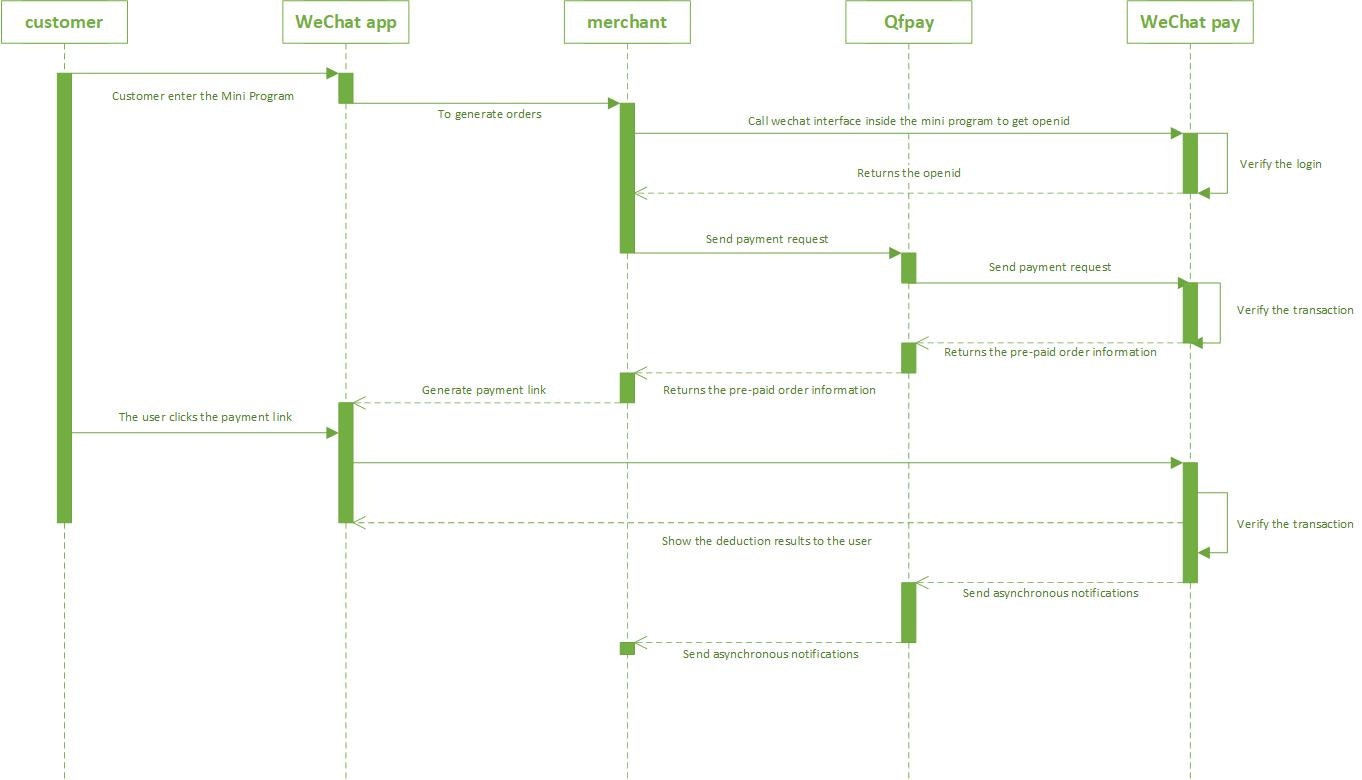
Step 1: WeChat real name authentificationBefore the payment function within WeChat can be used the business personnel must authenticate themselves on the official WeChat platform. Step 2: Get openid
Once real name authentication has been completed, the openid parameter is obtained through the small program of the real name of the merchant. The specific acquisition method is described in the Wechat documentation. Step 3: Send payment request
Initiate a payment request with the parameters below. Optionally merchants can activate real-name authentication with WeChat. Currently real-name identification is only available for Mainland Chinese citizens and include a person’s real name and national ID card number. In case identification is provided the payer’s wallet information like a connected bank card must be identical with the data provided by merchants. If customers did not yet bind their WeChat account to a bank card the payment will go through regardless.
Request Parameters
Response Parameters
Step 4: Evoke the payment module
For code instructions please refer to the tab below.
pay_params parameter, and then provide payment details accordingly. For more details, please refer to the Wechat documentation.
WeChat Mini Program Boilerplate
To get started quickly, download the QFPay WeChat Mini Program Boilerplate and get access to the MD5 hash algorithm.
Setup Instructions
- Sign up with QFPay and we bind your WeChat appid to your API credentials.
- Visit the WeChat MP portal at https://mp.weixin.qq.com and whitelist our environment for incoming server traffic: 开发 -> 开发设置 -> 服务器域名 -> request合法域名: e.g.
https://test-openapi-hk.qfapi.com - Copy and paste the files from the zip file to your local harddrive and setup a cloudfunction environment.
- Obtain the user openid with the cloudfunction “getUserOpenID” and run the API calls accroding to the code.