

Integration Overview
Choose the flow that matches your application architecture:
For all flows:
- Retrieve payment parameters via API
- Launch the FPS bank app
- Receive callback or verify payment status
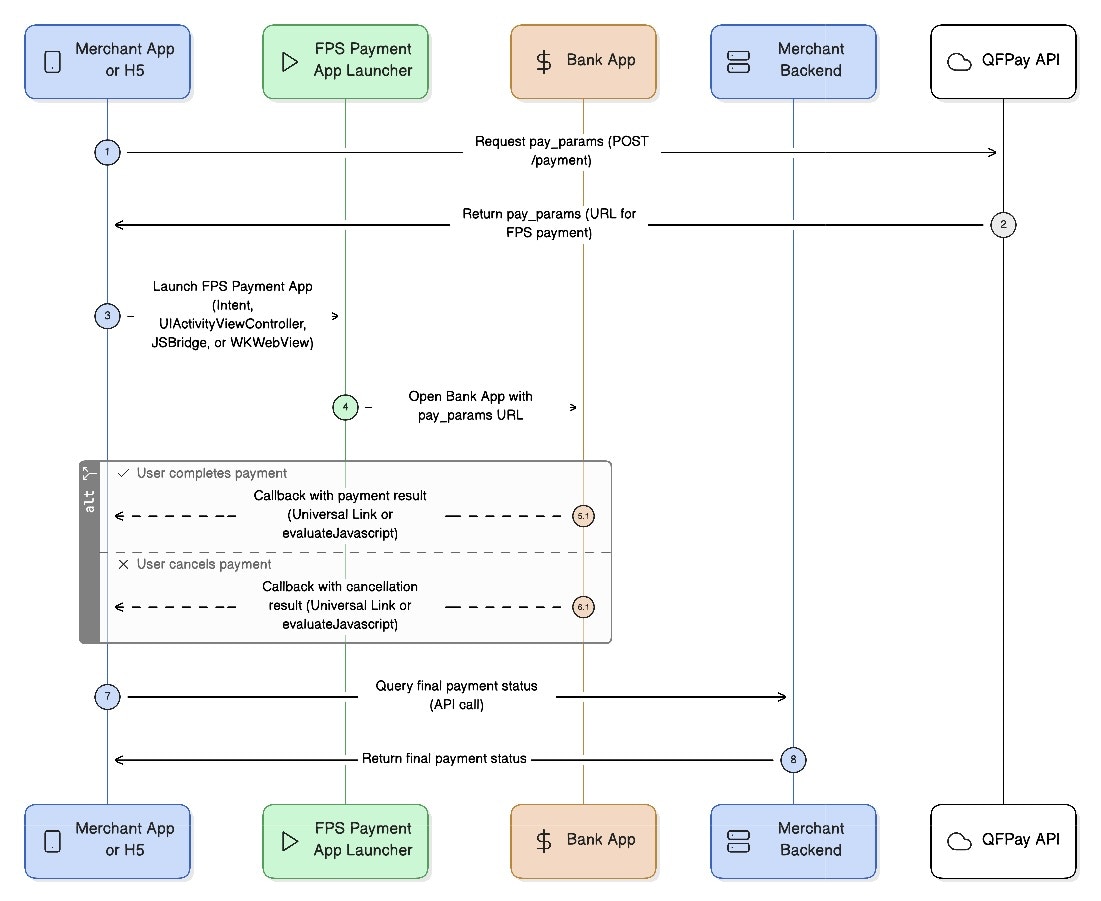
1. Retrieve Payment Parameters
EndpointPOST /trade/v1/payment
PayType: 802010
Request Parameters
Response Parameters
2. Android FPS Payment Flow
2.1 Native App-to-App Flow
This flow launches the banking app directly using an Android Intent.- Retrieve
pay_paramsfrom API - Launch bank app using Intent
- Receive result via
onActivityResult - Verify final status via backend
Android Example
2.2 Android H5-to-App (WebView)
Used when an H5 page inside WebView launches the FPS app. Flow- Enable JavaScript in WebView
- Register JS bridge
- H5 sends payment URL to Android
- Android launches bank app
- Return result to H5
- Verify payment via backend
3. iOS FPS Payment Flow
3.1 Native App-to-App Flow
iOS uses UIActivityViewController and App Extensions to launch bank apps. Flow- Retrieve payment URL
- Launch bank app via extension
- User completes payment
- App receives Universal Link callback
- Verify status via backend
Key Steps
• CreateNSExtensionItem• Package payment URL & callback URL
• Use type identifier:
hk.com.hkicl• Present
UIActivityViewController
3.2 iOS H5-to-App via WKWebView
Used when FPS payment is triggered from an H5 page. Flow- H5 retrieves payment URL
- H5 calls native app via JSBridge
- Native launches bank app
- Native returns result to H5
- Backend verifies final payment
Error Handling & Fallbacks
Result Codes
Always verify payment using your backend order query.
If FPS App Is Not Installed
If no supported bank app is available: • show an error message• provide fallback QR payment
• allow retry
Callback Failure
If callback or redirect fails: • inform user payment is verifying• re-query backend after 3–5 seconds
• display loading or retry option