

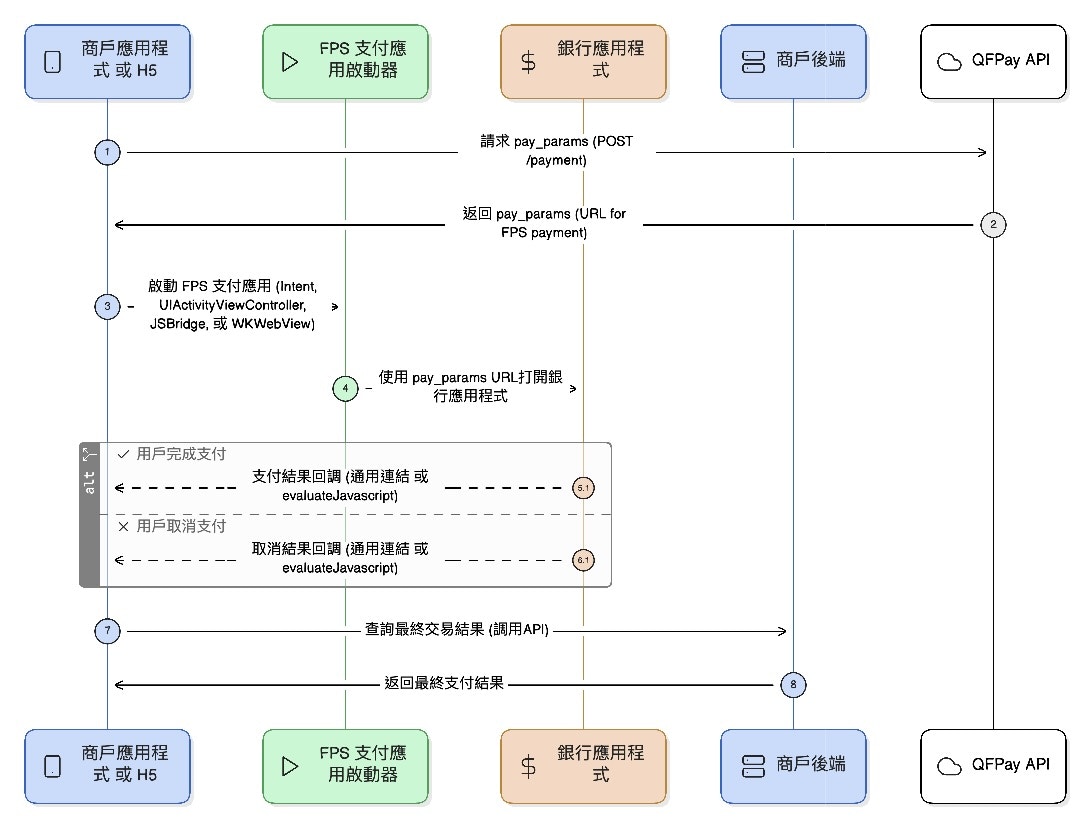
1. 取得支付參數
API 端點:/trade/v1/payment請求方法:
POST支付編碼(pay_type):
802010
請求參數
| 參數名稱 | 是否必填 | 類型 | 描述 |
|---|---|---|---|
| 通用請求參數 | 是 | 依照平台設定 | 詳見 通用請求參數 |
僅適用於 HSBC FPS 商戶如你的 FPS 為 HSBC 直連模式,商戶必須申請一張 獨立的 SSL 憑證(證書),且該憑證之 網域名稱必須與商戶主體一致。此設定為以下用途所必須:
FPS e-Cert 申請說明文件
- iOS Universal Link 回調驗證
- Android HTTPS 回調/重導驗證
- HSBC 生產環境上線及安全審核
FPS e-Cert 申請說明文件
回應參數
| 參數名稱 | 類型 | 描述 |
|---|---|---|
| 通用回應參數 | 依照平台設定 | 詳見 通用回應參數 |
pay_params | String(128) | 用於拉起銀行 FPS 支付應用的 URL,例如:https://fps.xxx/xxx |
2. Android FPS 支付流程
2.1 原生 App-to-App 流程
- 商戶先透過 API 取得
pay_params(URL) - 透過 Android
Intent啟動 FPS 支付 App - 設定 Action:
hk.com.hkicl,並以 keyurl傳入支付 URL - 使用
startActivityForResult連動支付 App - 在
onActivityResult接收支付結果 - 商戶 App 應以自身訂單狀態(建議查詢 API / 後端訂單狀態)確認最終結果
Java
/// 支付發起請求代碼
int payRequestCode = 100;

// 支付鏈接參數
String payUrl = "https://fps.qfpay.global/trade/v1/urltranslate/PAYCORE_SHORT_URL_202511075370911194";

// 封裝支付選擇應用(銀行 app)Intent
Intent intent = new Intent("hk.com.hkicl");

// Intent 添加參數 “url”,值為支付鏈接參數
intent.putExtra("url", payUrl);

// 啟動 app 選擇器,選擇支付銀行
startActivityForResult(intent, payRequestCode);

// 獲取支付返回結果
@Override
public void onActivityResult(int requestCode, int resultCode, @Nullable Intent data, @NonNull ComponentCaller caller) {
    super.onActivityResult(requestCode, resultCode, data, caller);
    if (requestCode == payRequestCode) {
        if (resultCode == RESULT_OK) { // 支付成功
        } else if (resultCode == RESULT_CANCELED) { // 支付失敗
        }
    }
}
2.2 Android H5-to-App 支付流程
H5 頁面可透過 WebView 調用 FPS App 完成支付,需實作以下幾步:- WebView 設定
- 啟用 JavaScript:
webView.getSettings().setJavaScriptEnabled(true) - 綁定 JS 與 Android 溝通橋接:
addJavascriptInterface(new JsBridge(), "AndroidBridge")
- 啟用 JavaScript:
- H5 觸發支付
- 用戶點擊付款後,H5 以 JS 呼叫 Android:
AndroidBridge.handleMessage(JSON.stringify({ url: 'https://fps.qfapi.com/xxx' }))
- 用戶點擊付款後,H5 以 JS 呼叫 Android:
- 原生 App 接收參數並拉起支付 App
- 組裝
Intent發送支付請求
- 組裝
- 接收結果並回傳給 H5
- 在
onActivityResult()內使用 JS 回傳 WebView
- 在
- 商戶應以自身訂單查詢為準確認最終支付狀態
Java
public class Web2AppCallPayActivity extends Activity {

    /**
     * 商户 App 加載的 H5 連結
     */
    private static final String WEB_PAY_LINK = "https://img-int.qfapi.com/upstatic/20251119/fpsH5CallApp/index.html";

    /**
     * 商户 App 內部 Web 組件
     */
    private WebView webView;

    /**
     * Web 端發起支付時傳入的 callBackId
     */
    private String callBackId;

    /**
     * 支付發起請求代碼
     */
    int payRequestCode = 100;

    @Override
    public void onCreate(@Nullable Bundle savedInstanceState, @Nullable PersistableBundle persistentState) {
        super.onCreate(savedInstanceState, persistentState);
        setContentView(R.layout.more_view);

        webView = findViewById(R.id.web_pay);
        webView.getSettings().setJavaScriptEnabled(true);
        webView.addJavascriptInterface(this, "AndroidInterface");
        webView.loadUrl(WEB_PAY_LINK);
    }

    @Override
    public void onActivityResult(int requestCode, int resultCode, @Nullable Intent data, @NonNull ComponentCaller caller) {
        super.onActivityResult(requestCode, resultCode, data, caller);
        if (requestCode == payRequestCode) {
            EvaluateBean evaluateBean = new EvaluateBean();
            evaluateBean.setCode(resultCode);
            if (resultCode == RESULT_OK) {
                evaluateBean.setRespmsg("Pay Success");
            } else if (resultCode == RESULT_CANCELED) {
                evaluateBean.setRespmsg("Pay Cancel");
            }
            String evaluateJson = new Gson().toJson(evaluateBean);

            webView.evaluateJavascript(
                "javascript:window.handleNativeCallback('" + callBackId + ")" + ",(" + evaluateJson + "')",
                null
            );
        }
    }

    @JavascriptInterface
    public void handleMessage(String paramFromWebPay) {
        if (TextUtils.isEmpty(paramFromWebPay)) return;
        WebParamsBean webParamsBean = new Gson().fromJson(paramFromWebPay, WebParamsBean.class);

        callBackId = webParamsBean.getCallbackId();
        String paymentRequestURL = webParamsBean.getParams().getPaymentRequestURL();
        launchBankPay(paymentRequestURL);
    }

    private void launchBankPay(String paymentRequestURL) {
        Intent intent = new Intent("hk.com.hkicl");
        intent.putExtra("url", paymentRequestURL);
        startActivityForResult(intent, payRequestCode);
    }
}
3. iOS App-to-App 支付流程
3.1 原生 App 啟動 FPS 支付 App
- 商戶先調用支付參數接口,獲取支付參數 URL(
pay_params) - 商戶 App 使用 iOS App Extension 框架 +
UIActivityViewController調起支援的支付 App(如銀行 App) - 消費者在支付 App 完成付款後,透過回調參數
callback(即商戶 App 的 Universal Link)跳轉回商戶 App - 商戶 App 必須根據自身訂單狀態確認最終支付結果
#import "FPSAppCallAppTool.h"
#import <UIKit/UIKit.h>
#import "define.h"

@implementation FPSAppCallAppTool

+ (FPSAppCallAppTool *)shareInstance {
    static FPSAppCallAppTool *model = nil;
    static dispatch_once_t onceToken;
    dispatch_once(&onceToken, ^{
        if (!model) {
            model = [[FPSAppCallAppTool alloc] init];
        }
    });
    return model;
}

- (void)fpsPaymentResult:(NSDictionary *) result {
    NSLog(@"%@", result);
    [[NSNotificationCenter defaultCenter] postNotificationName:kNotificationNameFPSPaymentH5CallAppResult object:result];
}

- (UIViewController *)getCurrentWindowRootVC {
    for (UIScene *scene in [UIApplication sharedApplication].connectedScenes) {
        if ([scene isKindOfClass:[UIWindowScene class]]) {
            UIWindowScene *windowScene = (UIWindowScene *)scene;
            for (UIWindow *window in windowScene.windows) {
                if (window.isKeyWindow) {
                    return window.rootViewController;
                }
            }
        }
    }
    return nil;
}

- (void)invokePaymentExtension:(NSString *)paymentRequestURL {
    @try {
        if (!paymentRequestURL || paymentRequestURL.length <= 0) {
            [self showAlert];
            return;
        }
    } @catch (NSException *exception) {
        return;
    }

    NSString *callbackURL = @"https://img-int.qfapi.com/trade/123"; //

    NSDictionary *paymentPayload = @{
        @"URL": paymentRequestURL,
        @"callback": callbackURL
    };

    NSItemProvider *itemProvider = [[NSItemProvider alloc]
        initWithItem:paymentPayload
        typeIdentifier:@"hk.com.hkicl"];

    NSExtensionItem *extensionItem = [[NSExtensionItem alloc] init];
    extensionItem.attachments = @[itemProvider];

    UIActivityViewController *activityVC = [[UIActivityViewController alloc]
        initWithActivityItems:@[extensionItem]
        applicationActivities:nil];

    if ([[UIDevice currentDevice] userInterfaceIdiom] == UIUserInterfaceIdiomPad) {
        activityVC.popoverPresentationController.sourceView = [self getCurrentWindowRootVC].view;
        activityVC.popoverPresentationController.sourceRect = [self getCurrentWindowRootVC].view.frame;
        activityVC.popoverPresentationController.permittedArrowDirections = UIPopoverArrowDirectionUp;
    }

    activityVC.completionWithItemsHandler = ^(UIActivityType  _Nullable activityType,
                                            BOOL completed,
                                            NSArray * _Nullable returnedItems,
                                            NSError * _Nullable error) {
        if (completed) {
            NSLog(@"用户选择了擴展:%@,處理完成", activityType);
        } else if (error) {
            NSLog(@"擴展調用失敗:%@", error.localizedDescription);
        } else {
            NSLog(@"用户取消了操作");
        }
    };

    [[self getCurrentWindowRootVC] presentViewController:activityVC animated:YES completion:nil];
}

- (void)showAlert{
    UIAlertController *alert = [UIAlertController alertControllerWithTitle:@"没有輸入參數"
                                                                   message:@"請先輸入FPS支付參數"
                                                            preferredStyle:UIAlertControllerStyleAlert];

    [alert addAction:[UIAlertAction actionWithTitle:@"确定"
                                               style:UIAlertActionStyleCancel
                                             handler:nil]];
    [[self getCurrentWindowRootVC] presentViewController:alert animated:YES completion:nil];
}

#pragma mark - 解析連結中的查詢參數
- (void)parseQueryParamsFromCallbackURL:(NSURL *)url {
    NSURLComponents *components = [NSURLComponents componentsWithURL:url resolvingAgainstBaseURL:NO];
    NSArray<NSURLQueryItem *> *queryItems = components.queryItems;

    NSMutableDictionary *params = [NSMutableDictionary dictionary];
    for (NSURLQueryItem *item in queryItems) {
        if (item.value) {
            params[item.name] = item.value;
        }
    }
    [self fpsPaymentResult: [params copy]];
}

@end
import Foundation
import UIKit

class FPSAppCallAppTool: NSObject {
    static let shared = FPSAppCallAppTool()

    func fpsPaymentResult(_ result: [String: Any]) {
        print(result)
        NotificationCenter.default.post(
            name: NSNotification.Name("kNotificationNameFPSPaymentH5CallAppResult"),
            object: result
        )
    }

    func invokePaymentExtension(paymentRequestURL: String?) {
        guard let paymentRequestURL = paymentRequestURL, !paymentRequestURL.isEmpty else {
            showAlert()
            return
        }

        let callbackURL = "https://img-int.qfapi.com/trade/123"; //

        let paymentPayload: [String: String] = [
            "URL": paymentRequestURL,
            "callback": callbackURL
        ]

        let itemProvider = NSItemProvider(
            item: paymentPayload as NSDictionary,
            typeIdentifier: "hk.com.hkicl"
        )

        let extensionItem = NSExtensionItem()
        extensionItem.attachments = [itemProvider]

        let activityVC = UIActivityViewController(
            activityItems: [extensionItem],
            applicationActivities: nil
        )

        if UIDevice.current.userInterfaceIdiom == .pad,
           let rootVC = getCurrentWindowRootVC() {
            activityVC.popoverPresentationController?.sourceView = rootVC.view
            activityVC.popoverPresentationController?.sourceRect = rootVC.view.bounds
            activityVC.popoverPresentationController?.permittedArrowDirections = .up
        }

        activityVC.completionWithItemsHandler = { (activityType, completed, _, error) in
            if completed {
                print("用户选择了擴展:\(activityType?.rawValue ?? "unknown"),處理完成")
            } else if let error = error {
                print("擴展调用失败:\(error.localizedDescription)")
            } else {
                print("用户取消了操作")
            }
        }

        if let rootVC = getCurrentWindowRootVC() {
            rootVC.present(activityVC, animated: true)
        } else {
            showAlert(message: "無法獲取當前界面,無法啟動支付")
        }
    }

    private func getCurrentWindowRootVC() -> UIViewController? {
        for scene in UIApplication.shared.connectedScenes {
            guard let windowScene = scene as? UIWindowScene else { continue }
            for window in windowScene.windows where window.isKeyWindow {
                return window.rootViewController
            }
        }
        return nil
    }

    private func showAlert(title: String = "没有輸入參數",
                           message: String = "請先輸入FPS支付參數") {
        let alert = UIAlertController(title: title, message: message, preferredStyle: .alert)
        alert.addAction(UIAlertAction(title: "確定", style: .cancel))
        getCurrentWindowRootVC()?.present(alert, animated: true)
    }

    func parseQueryParamsFromCallbackURL(_ url: URL) {
        guard let components = URLComponents(url: url, resolvingAgainstBaseURL: false),
              let queryItems = components.queryItems else { return }

        var params: [String: String] = [:]
        for item in queryItems {
            if let value = item.value {
                params[item.name] = value
            }
        }
        fpsPaymentResult(params)
    }
}
3.2 iOS H5-to-App 雙向通信支付流程
H5 調用原生 App 的核心在於建立雙向通信機制,完成支付參數的傳遞與結果回傳:- H5 調用後端接口獲得支付參數
- 使用 JsBridge 將支付參數傳遞給原生 App
- App 接收到後呼叫 FPS App 進行支付(同 3.1 流程)
- 支付完成後 App 將結果透過
evaluateJavaScript回傳給 H5 顯示 - 使用
WKWebView+ JSBridge 實現
#import "FPSWKWebView.h"
#import <WebKit/WebKit.h>
#import "FPSAppCallAppTool.h"
#import "define.h"

@interface FPSWKWebView ()<WKScriptMessageHandler, WKNavigationDelegate, WKUIDelegate>
@property(copy, nonatomic) NSString *callbackId;
@end

@implementation FPSWKWebView

- (instancetype)initWithFrame:(CGRect)frame{
    WKUserContentController *userContentController = [[WKUserContentController alloc] init];
    [userContentController addScriptMessageHandler:self name:@"NativeBridge"];

    WKWebViewConfiguration *config = [[WKWebViewConfiguration alloc] init];
    config.processPool = [[WKProcessPool alloc] init];
    config.userContentController = userContentController;
    config.preferences.javaScriptCanOpenWindowsAutomatically = YES;
    [config.preferences setValue:@YES forKey:@"allowFileAccessFromFileURLs"];

    self = [super initWithFrame:frame configuration:config];
    if (self) {
        self.autoresizingMask = UIViewAutoresizingFlexibleWidth | UIViewAutoresizingFlexibleHeight;
        self.navigationDelegate = self;
        self.UIDelegate = self;
        if (@available(iOS 16.4, *)) {
            self.inspectable = YES;
        }
        [[NSNotificationCenter defaultCenter] addObserver:self
                                                 selector:@selector(fpsPaymentResult:)
                                                     name:kNotificationNameFPSPaymentH5CallAppResult
                                                   object:nil];
    }
    return self;
}

- (void)fpsPaymentResult:(NSNotification *)notification {
    NSDictionary *params = nil;
    NSString *ret = notification.object[@"is_successful"];
    if ([ret isEqualToString: @"0"]) {
        params = @{@"code": @"3000", @"respmsg": @"Failed"};
    } else {
        params = @{@"code": @"0000", @"respmsg": @"Success"};
    }

    NSError *error;
    NSData *jsonData = [NSJSONSerialization dataWithJSONObject:params options:0 error:&error];
    if (error) return;

    NSString *jsonString = [[NSString alloc] initWithData:jsonData encoding:NSUTF8StringEncoding];
    NSString *jsCode = [NSString stringWithFormat:@"window.handleNativeCallback('%@', '%@');",
                        self.callbackId, jsonString];

    [self evaluateJavaScript:jsCode completionHandler:nil];
}

- (void)userContentController:(WKUserContentController *)userContentController
      didReceiveScriptMessage:(WKScriptMessage *)message {

    if (![message.name isEqualToString:@"NativeBridge"]) return;

    NSDictionary *body = message.body;
    NSString *action = body[@"action"];
    NSString *callbackId = body[@"callbackId"];

    if ([action isEqualToString:@"FPSH5CallApp"]) {
        NSString *paymentRequestURL = body[@"params"][@"paymentRequestURL"];
        self.callbackId = callbackId;
        [[FPSAppCallAppTool shareInstance] invokePaymentExtension:paymentRequestURL];
    }
}

- (void)dealloc {
    [self.configuration.userContentController removeScriptMessageHandlerForName:@"NativeBridge"];
    [[NSNotificationCenter defaultCenter] removeObserver:self name:kNotificationNameFPSPaymentH5CallAppResult object:nil];
}

@end
@preconcurrency import WebKit
import UIKit

class FPSWKWebView: WKWebView {
    private var callbackId: String?

    init(frame: CGRect) {
        let userContentController = WKUserContentController()
        let configuration = WKWebViewConfiguration()
        configuration.userContentController = userContentController
        configuration.processPool = WKProcessPool()
        configuration.preferences.javaScriptCanOpenWindowsAutomatically = true

        super.init(frame: frame, configuration: configuration)
        userContentController.add(self, name: "NativeBridge")

        NotificationCenter.default.addObserver(
            self,
            selector: #selector(fpsPaymentResult(_:)),
            name: Notification.Name("kNotificationNameFPSPaymentH5CallAppResult"),
            object: nil
        )
    }

    required init?(coder: NSCoder) { fatalError("init(coder:) has not been implemented") }

    @objc private func fpsPaymentResult(_ notification: Notification) {
        guard let paramsDict = notification.object as? [String: Any],
              let isSuccess = paramsDict["is_successful"] as? String,
              let callbackId = callbackId else { return }

        let result: [String: String] = Int(isSuccess) == 0
            ? ["code": "3000", "respmsg": "Failed"]
            : ["code": "0000", "respmsg": "Success"]

        guard let jsonData = try? JSONSerialization.data(withJSONObject: result),
              let jsonString = String(data: jsonData, encoding: .utf8) else { return }

        evaluateJavaScript("window.handleNativeCallback('\(callbackId)', '\(jsonString)');", completionHandler: nil)
    }

    deinit { NotificationCenter.default.removeObserver(self) }
}

extension FPSWKWebView: WKScriptMessageHandler {
    func userContentController(_ userContentController: WKUserContentController, didReceive message: WKScriptMessage) {
        guard message.name == "NativeBridge",
              let body = message.body as? [String: Any],
              let action = body["action"] as? String else { return }

        if action == "FPSH5CallApp" {
            guard let params = body["params"] as? [String: Any],
                  let paymentRequestURL = params["paymentRequestURL"] as? String else { return }

            callbackId = body["callbackId"] as? String
            FPSAppCallAppTool.shared.invokePaymentExtension(paymentRequestURL: paymentRequestURL)
        }
    }
}
function isAndroidPhone() {
  const ua = navigator.userAgent.toLowerCase();
  return /android/i.test(ua);
}

const iOSCallNative = (action, params = {}) => {
  return new Promise((resolve, reject) => {
    const callbackId = 'cb_' + Date.now() + '_' + Date.now();
    if (window?.webkit?.messageHandlers?.NativeBridge) {
      const callbacks = window?.nativeCallbacks;
      if (callbacks) callbacks[callbackId] = resolve;
      window.webkit.messageHandlers.NativeBridge.postMessage({
        action,
        params,
        callbackId
      });
    } else {
      reject(new Error('Not in WKWebView'));
    }
  });
};

const androidCallNative = (action, params = {}) => {
  return new Promise((resolve, reject) => {
    const callbackId = 'cb_' + Date.now() + '_' + Date.now();
    if (window?.AndroidInterface && typeof window.AndroidInterface.handleMessage === 'function') {
      const callbacks = window?.nativeCallbacks;
      if (callbacks) callbacks[callbackId] = resolve;
      window.AndroidInterface.handleMessage(JSON.stringify({
        action,
        params,
        callbackId
      }));
    } else {
      reject(new Error('Not in WKWebView'));
    }
  });
};

export const callNative = (action, params = {}) => {
  if (typeof window.handleNativeCallback !== 'function') {
    window.nativeCallbacks = {};
    window.handleNativeCallback = function (callbackId, result) {
      const callbackMap = window?.nativeCallbacks;
      if (!callbackMap) return;
      const callback = callbackMap[callbackId];
      if (callback && typeof callback === 'function') {
        callback(result);
        delete callbackMap[callbackId];
      }
    };
  }
  return isAndroidPhone() ? androidCallNative(action, params) : iOSCallNative(action, params);
};
下載範例 Demo
- Android 原生 App-to-App 示範:FPS H5 Demo
- Objective-C 示範:FPS Objective-C Demo
- Swift 示範:FPS Swift Demo
- JSBridge 示範:fps-jsBridge Demo