> ## Documentation Index
> Fetch the complete documentation index at: https://sdk.qfapi.com/llms.txt
> Use this file to discover all available pages before exploring further.
# 微信 JSAPI 支付(公眾號)
> 本文件說明如何整合微信公眾號支付(JSAPI),包含 OAuth 流程、openid 取得與支付參數構造。
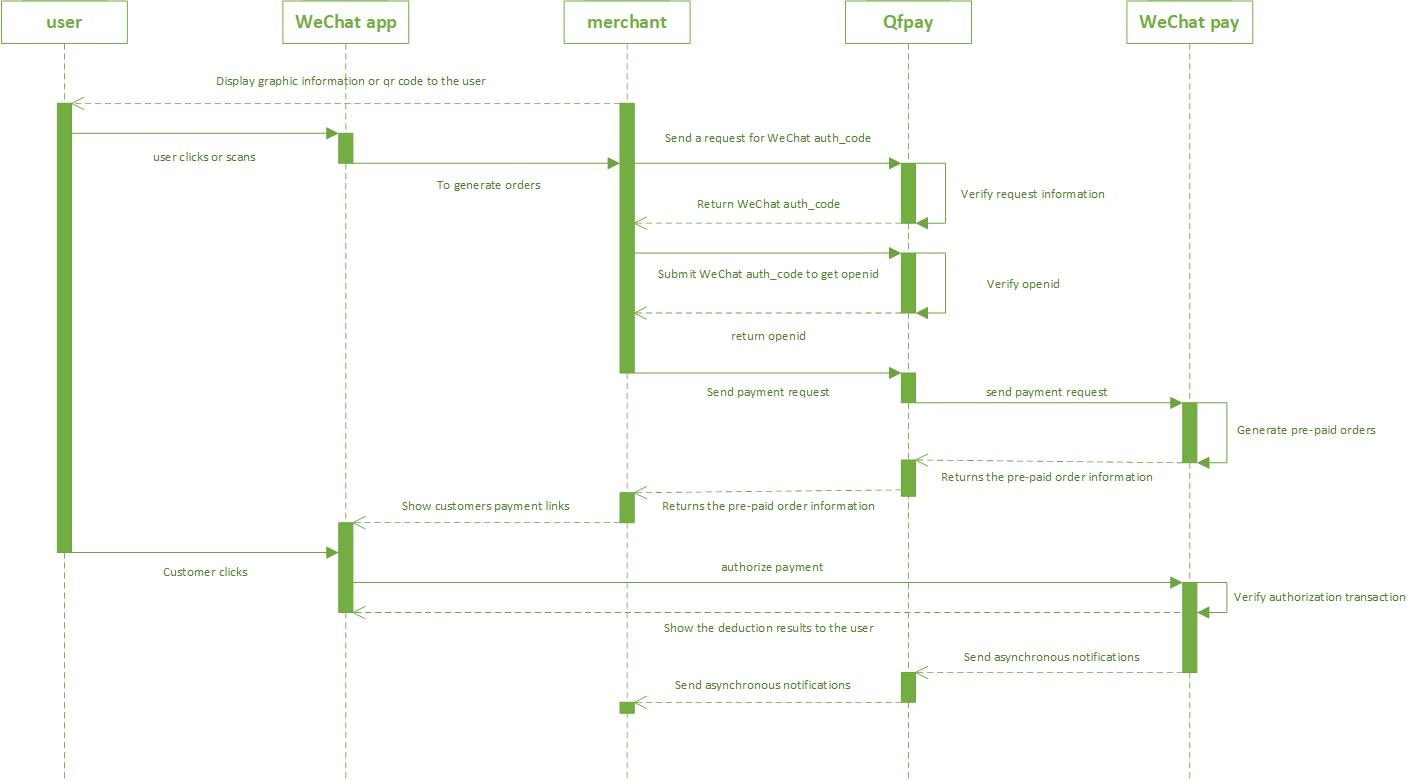 微信 JSAPI 支付僅適用於 **微信內建瀏覽器(WeChat WebView)** 環境。
JSAPI 支付無法從 Chrome、Safari 或其他外部瀏覽器發起。\
請確保使用者於微信 App 內開啟支付頁面。
***
# 整體流程說明
JSAPI 支付完整流程:
1. 於微信內取得 `oauth_code`
2. 使用 `oauth_code` 換取 `openid`
3. 呼叫 `/trade/v1/payment`
4. 取得 `pay_params`
5. 呼叫微信 JSAPI 支付模組
6. 透過 Webhook 或查詢 API 確認最終結果
***
# 整合模式
## 模式一:商戶擁有實名認證公眾號
條件:
* 商戶自行註冊並完成微信公眾號實名認證
* 公眾號已與 QFPay 帳戶綁定
* 商戶可自行取得使用者 `openid`
官方文件:
* [https://developers.weixin.qq.com/doc/offiaccount/en/Getting\_Started/Overview.html](https://developers.weixin.qq.com/doc/offiaccount/en/Getting_Started/Overview.html)
* [https://pay.weixin.qq.com/wiki/doc/api/jsapi.php](https://pay.weixin.qq.com/wiki/doc/api/jsapi.php)
## 模式二:使用 QFPay 提供之公眾號
適用於未擁有實名公眾號的商戶:
* OAuth 由 QFPay 代為處理
* 商戶透過 QFPay API 取得 `openid`
加拿大地區商戶若遇到 PayType 不一致,請依您帳戶實際開通的 PayType 為準,並參閱對應支付方式頁面。
***
# Step 1:取得 oauth\_code
## Endpoint and Method
```http Get OAuth Code theme={null}
GET /tool/v1/get_weixin_oauth_code
```
## Request Parameters
| 參數 | 必填 | 說明 |
| -------------- | --- | ----------------------- |
| `app_code` | 是 | QFPay 分配之 AppCode |
| `sign` | 是 | 依簽名規則生成的 MD5 簽名 |
| `redirect_uri` | 是 | 授權完成後跳轉網址(需 URL encode) |
| `mchid` | 視情況 | 僅代理商或特定模式需要,請按實際開通狀態使用。 |
## Example Request
```http Example URL theme={null}
https://test-openapi-hk.qfapi.com/tool/v1/get_weixin_oauth_code?app_code=&sign=&redirect_uri=
```
此請求必須在 **微信內建瀏覽器** 中開啟,否則無法取得 `oauth_code`。
成功後會跳轉至 `redirect_uri`,並附帶 query 參數 `code`:
```text Redirect Result theme={null}
https://your-redirect-uri.example/path?code=011xxxxx
```
***
# Step 2:取得 openid
## Endpoint and Method
```http Get OpenID theme={null}
GET /tool/v1/get_weixin_openid
```
## Request Headers
| Header | 必填 | 說明 |
| -------------- | -- | ------- |
| `X-QF-APPCODE` | 是 | AppCode |
| `X-QF-SIGN` | 是 | 依簽名規則生成 |
## Request Parameters
| 參數 | 必填 | 說明 |
| ------- | -- | -------------------- |
| `code` | 是 | OAuth 取得的授權碼(僅可使用一次) |
| `mchid` | 否 | QFPay 商戶 ID(部分商戶需要) |
## Example Request
```http Example Request (Query + Headers) theme={null}
GET https://test-openapi-hk.qfapi.com/tool/v1/get_weixin_openid?code=011xxxxx
X-QF-APPCODE:
X-QF-SIGN:
```
## Example Response
```json OpenID Response theme={null}
{
"resperr": "",
"respcd": "0000",
"respmsg": "",
"openid": "oo3Lss8d0hLOuyTuSJMVwLTk68JE"
}
```
## Response Parameters
| 參數 | 說明 |
| -------- | ------------------------ |
| `respcd` | Return Code(`0000` = 成功) |
| `openid` | 使用者 OpenID |
每次發起支付前,都必須重新取得新的 `oauth_code` 與 `openid`,請勿重用。
***
# Step 3:發起支付
## Endpoint and Method
```http Create Payment theme={null}
POST /trade/v1/payment
```
**PayType:** `800207`
## Request Headers
| Header | 必填 | 說明 |
| -------------- | -- | ------- |
| `X-QF-APPCODE` | 是 | AppCode |
| `X-QF-SIGN` | 是 | 依簽名規則生成 |
## Request Parameters
| 參數 | 必填 | 說明 |
| -------------- | -- | --------------------------------------- |
| `sub_openid` | 是 | 使用者 openid |
| `out_trade_no` | 是 | Merchant Order Number(商戶訂單號,必須唯一) |
| `txamt` | 是 | 金額(最小幣值單位) |
| `txcurrcd` | 是 | 幣別 |
| `txdtm` | 是 | Transaction Time(`YYYY-MM-DD hh:mm:ss`) |
| `limit_pay` | 否 | 限制支付方式 |
| `extend_info` | 否 | 實名資料(僅限中國大陸) |
## Example Request
```json Payment Request theme={null}
{
"pay_type": "800207",
"txamt": "100",
"txcurrcd": "HKD",
"out_trade_no": "ORDER12345",
"txdtm": "2026-03-03 18:00:00",
"sub_openid": "oo3Lss8d0hLOuyTuSJMVwLTk68JE"
}
```
## Example Response
```json Payment Response theme={null}
{
"respcd": "0000",
"resperr": "success",
"syssn": "20240424180500020000015704",
"sysdtm": "2024-04-24 15:19:37",
"pay_params": {
"appId": "wx123456",
"timeStamp": "1713944377",
"nonceStr": "abc123",
"package": "prepay_id=wx201...",
"signType": "MD5",
"paySign": "ABCDEF123456"
}
}
```
## Response Parameters
| 參數 | 說明 |
| ------------ | -------------------- |
| `syssn` | QFPay Transaction ID |
| `respcd` | Return Code |
| `sysdtm` | System Time |
| `pay_params` | 微信 JSAPI 呼叫所需參數 |
***
# Step 4:呼叫微信 JSAPI 支付模組
前端需使用 `pay_params` 呼叫微信支付:
```javascript WeixinJSBridge Example theme={null}
WeixinJSBridge.invoke(
"getBrandWCPayRequest",
pay_params,
function (res) {
// Handle JS callback (not final result)
}
);
```
前端 callback 並不等於最終支付結果。\
最終狀態請以 Webhook 或交易查詢 API 為準。
***
# 直接跳轉模式(QFPay Redirect)
如您採用 QFPay 代為跳轉方式,可使用:
```http Direct Entry theme={null}
GET https://o2-hk.qfapi.com/q/direct
```
***
# 整合注意事項與最佳實務
建議您保存以下欄位以便對帳與補單:
* `syssn`(QFPay Transaction ID)
* `out_trade_no`(Merchant Order Number)
請務必實作 Webhook(非同步通知)或交易查詢 API,以確認最終支付結果。\
`respcd=0000` 僅代表「成功建立交易」。
***
## 小結
* 僅適用於微信內建瀏覽器
* 需先完成 OAuth 並取得 openid
* 交易建立成功後需呼叫微信 JSAPI
* 最終交易結果以 Webhook / 查詢 API 為準
微信 JSAPI 支付僅適用於 **微信內建瀏覽器(WeChat WebView)** 環境。
JSAPI 支付無法從 Chrome、Safari 或其他外部瀏覽器發起。\
請確保使用者於微信 App 內開啟支付頁面。
***
# 整體流程說明
JSAPI 支付完整流程:
1. 於微信內取得 `oauth_code`
2. 使用 `oauth_code` 換取 `openid`
3. 呼叫 `/trade/v1/payment`
4. 取得 `pay_params`
5. 呼叫微信 JSAPI 支付模組
6. 透過 Webhook 或查詢 API 確認最終結果
***
# 整合模式
## 模式一:商戶擁有實名認證公眾號
條件:
* 商戶自行註冊並完成微信公眾號實名認證
* 公眾號已與 QFPay 帳戶綁定
* 商戶可自行取得使用者 `openid`
官方文件:
* [https://developers.weixin.qq.com/doc/offiaccount/en/Getting\_Started/Overview.html](https://developers.weixin.qq.com/doc/offiaccount/en/Getting_Started/Overview.html)
* [https://pay.weixin.qq.com/wiki/doc/api/jsapi.php](https://pay.weixin.qq.com/wiki/doc/api/jsapi.php)
## 模式二:使用 QFPay 提供之公眾號
適用於未擁有實名公眾號的商戶:
* OAuth 由 QFPay 代為處理
* 商戶透過 QFPay API 取得 `openid`
加拿大地區商戶若遇到 PayType 不一致,請依您帳戶實際開通的 PayType 為準,並參閱對應支付方式頁面。
***
# Step 1:取得 oauth\_code
## Endpoint and Method
```http Get OAuth Code theme={null}
GET /tool/v1/get_weixin_oauth_code
```
## Request Parameters
| 參數 | 必填 | 說明 |
| -------------- | --- | ----------------------- |
| `app_code` | 是 | QFPay 分配之 AppCode |
| `sign` | 是 | 依簽名規則生成的 MD5 簽名 |
| `redirect_uri` | 是 | 授權完成後跳轉網址(需 URL encode) |
| `mchid` | 視情況 | 僅代理商或特定模式需要,請按實際開通狀態使用。 |
## Example Request
```http Example URL theme={null}
https://test-openapi-hk.qfapi.com/tool/v1/get_weixin_oauth_code?app_code=&sign=&redirect_uri=
```
此請求必須在 **微信內建瀏覽器** 中開啟,否則無法取得 `oauth_code`。
成功後會跳轉至 `redirect_uri`,並附帶 query 參數 `code`:
```text Redirect Result theme={null}
https://your-redirect-uri.example/path?code=011xxxxx
```
***
# Step 2:取得 openid
## Endpoint and Method
```http Get OpenID theme={null}
GET /tool/v1/get_weixin_openid
```
## Request Headers
| Header | 必填 | 說明 |
| -------------- | -- | ------- |
| `X-QF-APPCODE` | 是 | AppCode |
| `X-QF-SIGN` | 是 | 依簽名規則生成 |
## Request Parameters
| 參數 | 必填 | 說明 |
| ------- | -- | -------------------- |
| `code` | 是 | OAuth 取得的授權碼(僅可使用一次) |
| `mchid` | 否 | QFPay 商戶 ID(部分商戶需要) |
## Example Request
```http Example Request (Query + Headers) theme={null}
GET https://test-openapi-hk.qfapi.com/tool/v1/get_weixin_openid?code=011xxxxx
X-QF-APPCODE:
X-QF-SIGN:
```
## Example Response
```json OpenID Response theme={null}
{
"resperr": "",
"respcd": "0000",
"respmsg": "",
"openid": "oo3Lss8d0hLOuyTuSJMVwLTk68JE"
}
```
## Response Parameters
| 參數 | 說明 |
| -------- | ------------------------ |
| `respcd` | Return Code(`0000` = 成功) |
| `openid` | 使用者 OpenID |
每次發起支付前,都必須重新取得新的 `oauth_code` 與 `openid`,請勿重用。
***
# Step 3:發起支付
## Endpoint and Method
```http Create Payment theme={null}
POST /trade/v1/payment
```
**PayType:** `800207`
## Request Headers
| Header | 必填 | 說明 |
| -------------- | -- | ------- |
| `X-QF-APPCODE` | 是 | AppCode |
| `X-QF-SIGN` | 是 | 依簽名規則生成 |
## Request Parameters
| 參數 | 必填 | 說明 |
| -------------- | -- | --------------------------------------- |
| `sub_openid` | 是 | 使用者 openid |
| `out_trade_no` | 是 | Merchant Order Number(商戶訂單號,必須唯一) |
| `txamt` | 是 | 金額(最小幣值單位) |
| `txcurrcd` | 是 | 幣別 |
| `txdtm` | 是 | Transaction Time(`YYYY-MM-DD hh:mm:ss`) |
| `limit_pay` | 否 | 限制支付方式 |
| `extend_info` | 否 | 實名資料(僅限中國大陸) |
## Example Request
```json Payment Request theme={null}
{
"pay_type": "800207",
"txamt": "100",
"txcurrcd": "HKD",
"out_trade_no": "ORDER12345",
"txdtm": "2026-03-03 18:00:00",
"sub_openid": "oo3Lss8d0hLOuyTuSJMVwLTk68JE"
}
```
## Example Response
```json Payment Response theme={null}
{
"respcd": "0000",
"resperr": "success",
"syssn": "20240424180500020000015704",
"sysdtm": "2024-04-24 15:19:37",
"pay_params": {
"appId": "wx123456",
"timeStamp": "1713944377",
"nonceStr": "abc123",
"package": "prepay_id=wx201...",
"signType": "MD5",
"paySign": "ABCDEF123456"
}
}
```
## Response Parameters
| 參數 | 說明 |
| ------------ | -------------------- |
| `syssn` | QFPay Transaction ID |
| `respcd` | Return Code |
| `sysdtm` | System Time |
| `pay_params` | 微信 JSAPI 呼叫所需參數 |
***
# Step 4:呼叫微信 JSAPI 支付模組
前端需使用 `pay_params` 呼叫微信支付:
```javascript WeixinJSBridge Example theme={null}
WeixinJSBridge.invoke(
"getBrandWCPayRequest",
pay_params,
function (res) {
// Handle JS callback (not final result)
}
);
```
前端 callback 並不等於最終支付結果。\
最終狀態請以 Webhook 或交易查詢 API 為準。
***
# 直接跳轉模式(QFPay Redirect)
如您採用 QFPay 代為跳轉方式,可使用:
```http Direct Entry theme={null}
GET https://o2-hk.qfapi.com/q/direct
```
***
# 整合注意事項與最佳實務
建議您保存以下欄位以便對帳與補單:
* `syssn`(QFPay Transaction ID)
* `out_trade_no`(Merchant Order Number)
請務必實作 Webhook(非同步通知)或交易查詢 API,以確認最終支付結果。\
`respcd=0000` 僅代表「成功建立交易」。
***
## 小結
* 僅適用於微信內建瀏覽器
* 需先完成 OAuth 並取得 openid
* 交易建立成功後需呼叫微信 JSAPI
* 最終交易結果以 Webhook / 查詢 API 為準