> ## Documentation Index
> Fetch the complete documentation index at: https://sdk.qfapi.com/llms.txt
> Use this file to discover all available pages before exploring further.
# FPS 應用程式互調
> FPS 應用程式互調用支付集成指南 (App-to-App, H5-to-App 支援 Android 和 iOS)
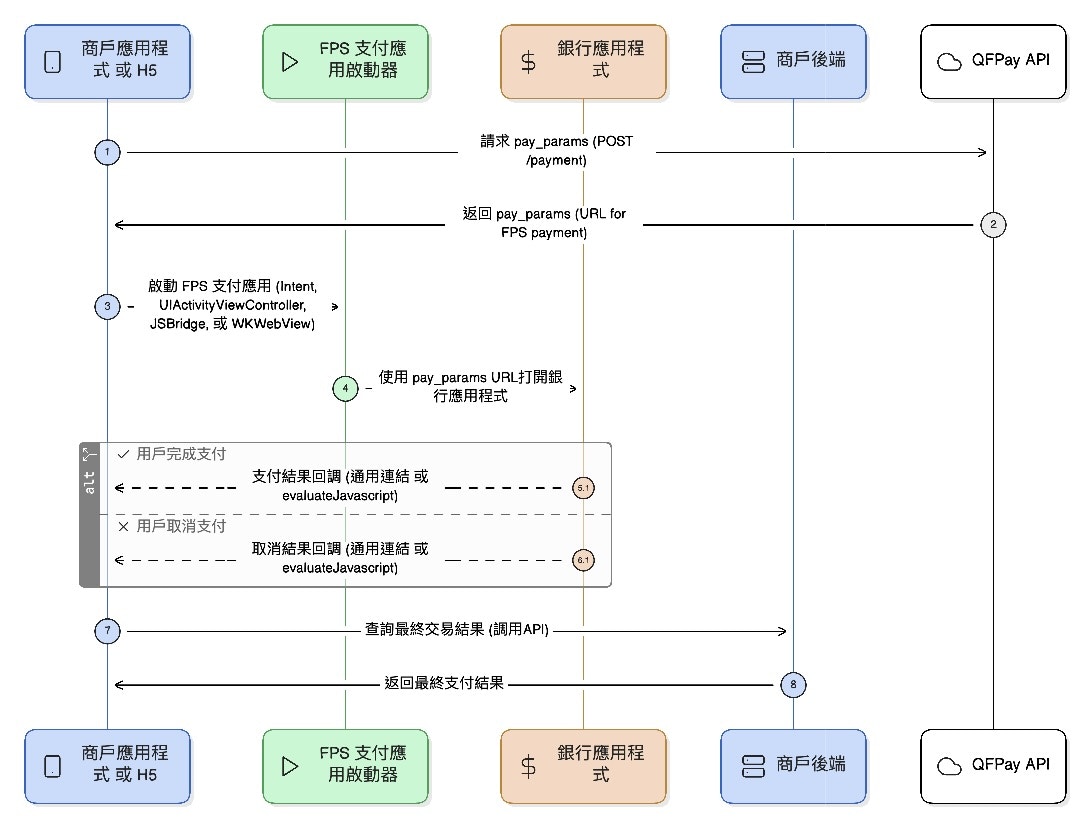
本頁說明商戶 App 或 H5 如何透過 QFPay API 與 Intent / Universal Link 等方式喚起銀行支付應用,完成 FPS App-to-App 的支付流程。支援 Android 與 iOS,並提供代碼範例與 Demo 下載連結。
***
## 1. 取得支付參數
**API 端點**:`/trade/v1/payment`\
**請求方法**:`POST`\
**支付編碼(pay\_type)**:`802010`
### 請求參數
| 參數名稱 | 是否必填 | 類型 | 描述 |
| ------ | ---- | ------ | -------------------------------------------------------------- |
| 通用請求參數 | 是 | 依照平台設定 | 詳見 [通用請求參數](/zh-hant/integration/api-reference/request-format) |
僅適用於 HSBC FPS 商戶
如你的 FPS 為 **HSBC 直連模式**,商戶必須申請一張 **獨立的 SSL 憑證(證書)**,且該憑證之 **網域名稱必須與商戶主體一致**。
此設定為以下用途所必須:
* iOS Universal Link 回調驗證
* Android HTTPS 回調/重導驗證
* HSBC 生產環境上線及安全審核
詳細申請流程、CSR 產生方式及所需文件,請參閱:\
[FPS e-Cert 申請說明文件](/zh-hant/integration/online-shop/integration-by-payment-type/fps/fps-ecert-setup)
### 回應參數
| 參數名稱 | 類型 | 描述 |
| ------------ | ----------- | --------------------------------------------------------------- |
| 通用回應參數 | 依照平台設定 | 詳見 [通用回應參數](/zh-hant/integration/api-reference/response-format) |
| `pay_params` | String(128) | 用於拉起銀行 FPS 支付應用的 URL,例如:`https://fps.xxx/xxx` |
***
## 2. Android FPS 支付流程
### 2.1 原生 App-to-App 流程
1. 商戶先透過 API 取得 `pay_params`(URL)
2. 透過 Android `Intent` 啟動 FPS 支付 App
3. 設定 Action:`hk.com.hkicl`,並以 key `url` 傳入支付 URL
4. 使用 `startActivityForResult` 連動支付 App
5. 在 `onActivityResult` 接收支付結果
6. 商戶 App 應以自身訂單狀態(建議查詢 API / 後端訂單狀態)確認最終結果
 **Android Java 啟動範例**
```java Java theme={null}
/// 支付發起請求代碼
int payRequestCode = 100;
// 支付鏈接參數
String payUrl = "https://fps.qfpay.global/trade/v1/urltranslate/PAYCORE_SHORT_URL_202511075370911194";
// 封裝支付選擇應用(銀行 app)Intent
Intent intent = new Intent("hk.com.hkicl");
// Intent 添加參數 “url”,值為支付鏈接參數
intent.putExtra("url", payUrl);
// 啟動 app 選擇器,選擇支付銀行
startActivityForResult(intent, payRequestCode);
// 獲取支付返回結果
@Override
public void onActivityResult(int requestCode, int resultCode, @Nullable Intent data, @NonNull ComponentCaller caller) {
super.onActivityResult(requestCode, resultCode, data, caller);
if (requestCode == payRequestCode) {
if (resultCode == RESULT_OK) { // 支付成功
} else if (resultCode == RESULT_CANCELED) { // 支付失敗
}
}
}
```
***
### 2.2 Android H5-to-App 支付流程
H5 頁面可透過 WebView 調用 FPS App 完成支付,需實作以下幾步:
1. **WebView 設定**
* 啟用 JavaScript:`webView.getSettings().setJavaScriptEnabled(true)`
* 綁定 JS 與 Android 溝通橋接:`addJavascriptInterface(new JsBridge(), "AndroidBridge")`
2. **H5 觸發支付**
* 用戶點擊付款後,H5 以 JS 呼叫 Android:\
`AndroidBridge.handleMessage(JSON.stringify({ url: 'https://fps.qfapi.com/xxx' }))`
3. **原生 App 接收參數並拉起支付 App**
* 組裝 `Intent` 發送支付請求
4. **接收結果並回傳給 H5**
* 在 `onActivityResult()` 內使用 JS 回傳 WebView
5. **商戶應以自身訂單查詢為準**確認最終支付狀態
**Android WebView H5-to-App 範例**
```java Java theme={null}
public class Web2AppCallPayActivity extends Activity {
/**
* 商户 App 加載的 H5 連結
*/
private static final String WEB_PAY_LINK = "https://img-int.qfapi.com/upstatic/20251119/fpsH5CallApp/index.html";
/**
* 商户 App 內部 Web 組件
*/
private WebView webView;
/**
* Web 端發起支付時傳入的 callBackId
*/
private String callBackId;
/**
* 支付發起請求代碼
*/
int payRequestCode = 100;
@Override
public void onCreate(@Nullable Bundle savedInstanceState, @Nullable PersistableBundle persistentState) {
super.onCreate(savedInstanceState, persistentState);
setContentView(R.layout.more_view);
webView = findViewById(R.id.web_pay);
webView.getSettings().setJavaScriptEnabled(true);
webView.addJavascriptInterface(this, "AndroidInterface");
webView.loadUrl(WEB_PAY_LINK);
}
@Override
public void onActivityResult(int requestCode, int resultCode, @Nullable Intent data, @NonNull ComponentCaller caller) {
super.onActivityResult(requestCode, resultCode, data, caller);
if (requestCode == payRequestCode) {
EvaluateBean evaluateBean = new EvaluateBean();
evaluateBean.setCode(resultCode);
if (resultCode == RESULT_OK) {
evaluateBean.setRespmsg("Pay Success");
} else if (resultCode == RESULT_CANCELED) {
evaluateBean.setRespmsg("Pay Cancel");
}
String evaluateJson = new Gson().toJson(evaluateBean);
webView.evaluateJavascript(
"javascript:window.handleNativeCallback('" + callBackId + ")" + ",(" + evaluateJson + "')",
null
);
}
}
@JavascriptInterface
public void handleMessage(String paramFromWebPay) {
if (TextUtils.isEmpty(paramFromWebPay)) return;
WebParamsBean webParamsBean = new Gson().fromJson(paramFromWebPay, WebParamsBean.class);
callBackId = webParamsBean.getCallbackId();
String paymentRequestURL = webParamsBean.getParams().getPaymentRequestURL();
launchBankPay(paymentRequestURL);
}
private void launchBankPay(String paymentRequestURL) {
Intent intent = new Intent("hk.com.hkicl");
intent.putExtra("url", paymentRequestURL);
startActivityForResult(intent, payRequestCode);
}
}
```
***
## 3. iOS App-to-App 支付流程
### 3.1 原生 App 啟動 FPS 支付 App
1. 商戶先調用支付參數接口,獲取支付參數 URL(`pay_params`)
2. 商戶 App 使用 iOS App Extension 框架 + `UIActivityViewController` 調起支援的支付 App(如銀行 App)
3. 消費者在支付 App 完成付款後,透過回調參數 `callback`(即商戶 App 的 Universal Link)跳轉回商戶 App
4. 商戶 App 必須根據自身訂單狀態確認最終支付結果
參考:
* [Universal Links 官方說明](https://developer.apple.com/documentation/xcode/supporting-universal-links-in-your-app)
* [Associated Domains 配置方式](https://developer.apple.com/documentation/xcode/supporting-associated-domains)
```objectivec Objective-C theme={null}
#import "FPSAppCallAppTool.h"
#import
#import "define.h"
@implementation FPSAppCallAppTool
+ (FPSAppCallAppTool *)shareInstance {
static FPSAppCallAppTool *model = nil;
static dispatch_once_t onceToken;
dispatch_once(&onceToken, ^{
if (!model) {
model = [[FPSAppCallAppTool alloc] init];
}
});
return model;
}
- (void)fpsPaymentResult:(NSDictionary *) result {
NSLog(@"%@", result);
[[NSNotificationCenter defaultCenter] postNotificationName:kNotificationNameFPSPaymentH5CallAppResult object:result];
}
- (UIViewController *)getCurrentWindowRootVC {
for (UIScene *scene in [UIApplication sharedApplication].connectedScenes) {
if ([scene isKindOfClass:[UIWindowScene class]]) {
UIWindowScene *windowScene = (UIWindowScene *)scene;
for (UIWindow *window in windowScene.windows) {
if (window.isKeyWindow) {
return window.rootViewController;
}
}
}
}
return nil;
}
- (void)invokePaymentExtension:(NSString *)paymentRequestURL {
@try {
if (!paymentRequestURL || paymentRequestURL.length <= 0) {
[self showAlert];
return;
}
} @catch (NSException *exception) {
return;
}
NSString *callbackURL = @"https://img-int.qfapi.com/trade/123"; //
NSDictionary *paymentPayload = @{
@"URL": paymentRequestURL,
@"callback": callbackURL
};
NSItemProvider *itemProvider = [[NSItemProvider alloc]
initWithItem:paymentPayload
typeIdentifier:@"hk.com.hkicl"];
NSExtensionItem *extensionItem = [[NSExtensionItem alloc] init];
extensionItem.attachments = @[itemProvider];
UIActivityViewController *activityVC = [[UIActivityViewController alloc]
initWithActivityItems:@[extensionItem]
applicationActivities:nil];
if ([[UIDevice currentDevice] userInterfaceIdiom] == UIUserInterfaceIdiomPad) {
activityVC.popoverPresentationController.sourceView = [self getCurrentWindowRootVC].view;
activityVC.popoverPresentationController.sourceRect = [self getCurrentWindowRootVC].view.frame;
activityVC.popoverPresentationController.permittedArrowDirections = UIPopoverArrowDirectionUp;
}
activityVC.completionWithItemsHandler = ^(UIActivityType _Nullable activityType,
BOOL completed,
NSArray * _Nullable returnedItems,
NSError * _Nullable error) {
if (completed) {
NSLog(@"用户选择了擴展:%@,處理完成", activityType);
} else if (error) {
NSLog(@"擴展調用失敗:%@", error.localizedDescription);
} else {
NSLog(@"用户取消了操作");
}
};
[[self getCurrentWindowRootVC] presentViewController:activityVC animated:YES completion:nil];
}
- (void)showAlert{
UIAlertController *alert = [UIAlertController alertControllerWithTitle:@"没有輸入參數"
message:@"請先輸入FPS支付參數"
preferredStyle:UIAlertControllerStyleAlert];
[alert addAction:[UIAlertAction actionWithTitle:@"确定"
style:UIAlertActionStyleCancel
handler:nil]];
[[self getCurrentWindowRootVC] presentViewController:alert animated:YES completion:nil];
}
#pragma mark - 解析連結中的查詢參數
- (void)parseQueryParamsFromCallbackURL:(NSURL *)url {
NSURLComponents *components = [NSURLComponents componentsWithURL:url resolvingAgainstBaseURL:NO];
NSArray *queryItems = components.queryItems;
NSMutableDictionary *params = [NSMutableDictionary dictionary];
for (NSURLQueryItem *item in queryItems) {
if (item.value) {
params[item.name] = item.value;
}
}
[self fpsPaymentResult: [params copy]];
}
@end
```
```swift Swift theme={null}
import Foundation
import UIKit
class FPSAppCallAppTool: NSObject {
static let shared = FPSAppCallAppTool()
func fpsPaymentResult(_ result: [String: Any]) {
print(result)
NotificationCenter.default.post(
name: NSNotification.Name("kNotificationNameFPSPaymentH5CallAppResult"),
object: result
)
}
func invokePaymentExtension(paymentRequestURL: String?) {
guard let paymentRequestURL = paymentRequestURL, !paymentRequestURL.isEmpty else {
showAlert()
return
}
let callbackURL = "https://img-int.qfapi.com/trade/123"; //
let paymentPayload: [String: String] = [
"URL": paymentRequestURL,
"callback": callbackURL
]
let itemProvider = NSItemProvider(
item: paymentPayload as NSDictionary,
typeIdentifier: "hk.com.hkicl"
)
let extensionItem = NSExtensionItem()
extensionItem.attachments = [itemProvider]
let activityVC = UIActivityViewController(
activityItems: [extensionItem],
applicationActivities: nil
)
if UIDevice.current.userInterfaceIdiom == .pad,
let rootVC = getCurrentWindowRootVC() {
activityVC.popoverPresentationController?.sourceView = rootVC.view
activityVC.popoverPresentationController?.sourceRect = rootVC.view.bounds
activityVC.popoverPresentationController?.permittedArrowDirections = .up
}
activityVC.completionWithItemsHandler = { (activityType, completed, _, error) in
if completed {
print("用户选择了擴展:\(activityType?.rawValue ?? "unknown"),處理完成")
} else if let error = error {
print("擴展调用失败:\(error.localizedDescription)")
} else {
print("用户取消了操作")
}
}
if let rootVC = getCurrentWindowRootVC() {
rootVC.present(activityVC, animated: true)
} else {
showAlert(message: "無法獲取當前界面,無法啟動支付")
}
}
private func getCurrentWindowRootVC() -> UIViewController? {
for scene in UIApplication.shared.connectedScenes {
guard let windowScene = scene as? UIWindowScene else { continue }
for window in windowScene.windows where window.isKeyWindow {
return window.rootViewController
}
}
return nil
}
private func showAlert(title: String = "没有輸入參數",
message: String = "請先輸入FPS支付參數") {
let alert = UIAlertController(title: title, message: message, preferredStyle: .alert)
alert.addAction(UIAlertAction(title: "確定", style: .cancel))
getCurrentWindowRootVC()?.present(alert, animated: true)
}
func parseQueryParamsFromCallbackURL(_ url: URL) {
guard let components = URLComponents(url: url, resolvingAgainstBaseURL: false),
let queryItems = components.queryItems else { return }
var params: [String: String] = [:]
for item in queryItems {
if let value = item.value {
params[item.name] = value
}
}
fpsPaymentResult(params)
}
}
```
***
### 3.2 iOS H5-to-App 雙向通信支付流程
H5 調用原生 App 的核心在於建立雙向通信機制,完成支付參數的傳遞與結果回傳:
1. H5 調用後端接口獲得支付參數
2. 使用 JsBridge 將支付參數傳遞給原生 App
3. App 接收到後呼叫 FPS App 進行支付(同 3.1 流程)
4. 支付完成後 App 將結果透過 `evaluateJavaScript` 回傳給 H5 顯示
5. 使用 `WKWebView` + JSBridge 實現
```objectivec Objective-C WKWebView theme={null}
#import "FPSWKWebView.h"
#import
#import "FPSAppCallAppTool.h"
#import "define.h"
@interface FPSWKWebView ()
@property(copy, nonatomic) NSString *callbackId;
@end
@implementation FPSWKWebView
- (instancetype)initWithFrame:(CGRect)frame{
WKUserContentController *userContentController = [[WKUserContentController alloc] init];
[userContentController addScriptMessageHandler:self name:@"NativeBridge"];
WKWebViewConfiguration *config = [[WKWebViewConfiguration alloc] init];
config.processPool = [[WKProcessPool alloc] init];
config.userContentController = userContentController;
config.preferences.javaScriptCanOpenWindowsAutomatically = YES;
[config.preferences setValue:@YES forKey:@"allowFileAccessFromFileURLs"];
self = [super initWithFrame:frame configuration:config];
if (self) {
self.autoresizingMask = UIViewAutoresizingFlexibleWidth | UIViewAutoresizingFlexibleHeight;
self.navigationDelegate = self;
self.UIDelegate = self;
if (@available(iOS 16.4, *)) {
self.inspectable = YES;
}
[[NSNotificationCenter defaultCenter] addObserver:self
selector:@selector(fpsPaymentResult:)
name:kNotificationNameFPSPaymentH5CallAppResult
object:nil];
}
return self;
}
- (void)fpsPaymentResult:(NSNotification *)notification {
NSDictionary *params = nil;
NSString *ret = notification.object[@"is_successful"];
if ([ret isEqualToString: @"0"]) {
params = @{@"code": @"3000", @"respmsg": @"Failed"};
} else {
params = @{@"code": @"0000", @"respmsg": @"Success"};
}
NSError *error;
NSData *jsonData = [NSJSONSerialization dataWithJSONObject:params options:0 error:&error];
if (error) return;
NSString *jsonString = [[NSString alloc] initWithData:jsonData encoding:NSUTF8StringEncoding];
NSString *jsCode = [NSString stringWithFormat:@"window.handleNativeCallback('%@', '%@');",
self.callbackId, jsonString];
[self evaluateJavaScript:jsCode completionHandler:nil];
}
- (void)userContentController:(WKUserContentController *)userContentController
didReceiveScriptMessage:(WKScriptMessage *)message {
if (![message.name isEqualToString:@"NativeBridge"]) return;
NSDictionary *body = message.body;
NSString *action = body[@"action"];
NSString *callbackId = body[@"callbackId"];
if ([action isEqualToString:@"FPSH5CallApp"]) {
NSString *paymentRequestURL = body[@"params"][@"paymentRequestURL"];
self.callbackId = callbackId;
[[FPSAppCallAppTool shareInstance] invokePaymentExtension:paymentRequestURL];
}
}
- (void)dealloc {
[self.configuration.userContentController removeScriptMessageHandlerForName:@"NativeBridge"];
[[NSNotificationCenter defaultCenter] removeObserver:self name:kNotificationNameFPSPaymentH5CallAppResult object:nil];
}
@end
```
```swift Swift WKWebView theme={null}
@preconcurrency import WebKit
import UIKit
class FPSWKWebView: WKWebView {
private var callbackId: String?
init(frame: CGRect) {
let userContentController = WKUserContentController()
let configuration = WKWebViewConfiguration()
configuration.userContentController = userContentController
configuration.processPool = WKProcessPool()
configuration.preferences.javaScriptCanOpenWindowsAutomatically = true
super.init(frame: frame, configuration: configuration)
userContentController.add(self, name: "NativeBridge")
NotificationCenter.default.addObserver(
self,
selector: #selector(fpsPaymentResult(_:)),
name: Notification.Name("kNotificationNameFPSPaymentH5CallAppResult"),
object: nil
)
}
required init?(coder: NSCoder) { fatalError("init(coder:) has not been implemented") }
@objc private func fpsPaymentResult(_ notification: Notification) {
guard let paramsDict = notification.object as? [String: Any],
let isSuccess = paramsDict["is_successful"] as? String,
let callbackId = callbackId else { return }
let result: [String: String] = Int(isSuccess) == 0
? ["code": "3000", "respmsg": "Failed"]
: ["code": "0000", "respmsg": "Success"]
guard let jsonData = try? JSONSerialization.data(withJSONObject: result),
let jsonString = String(data: jsonData, encoding: .utf8) else { return }
evaluateJavaScript("window.handleNativeCallback('\(callbackId)', '\(jsonString)');", completionHandler: nil)
}
deinit { NotificationCenter.default.removeObserver(self) }
}
extension FPSWKWebView: WKScriptMessageHandler {
func userContentController(_ userContentController: WKUserContentController, didReceive message: WKScriptMessage) {
guard message.name == "NativeBridge",
let body = message.body as? [String: Any],
let action = body["action"] as? String else { return }
if action == "FPSH5CallApp" {
guard let params = body["params"] as? [String: Any],
let paymentRequestURL = params["paymentRequestURL"] as? String else { return }
callbackId = body["callbackId"] as? String
FPSAppCallAppTool.shared.invokePaymentExtension(paymentRequestURL: paymentRequestURL)
}
}
}
```
```javascript JsBridge theme={null}
function isAndroidPhone() {
const ua = navigator.userAgent.toLowerCase();
return /android/i.test(ua);
}
const iOSCallNative = (action, params = {}) => {
return new Promise((resolve, reject) => {
const callbackId = 'cb_' + Date.now() + '_' + Date.now();
if (window?.webkit?.messageHandlers?.NativeBridge) {
const callbacks = window?.nativeCallbacks;
if (callbacks) callbacks[callbackId] = resolve;
window.webkit.messageHandlers.NativeBridge.postMessage({
action,
params,
callbackId
});
} else {
reject(new Error('Not in WKWebView'));
}
});
};
const androidCallNative = (action, params = {}) => {
return new Promise((resolve, reject) => {
const callbackId = 'cb_' + Date.now() + '_' + Date.now();
if (window?.AndroidInterface && typeof window.AndroidInterface.handleMessage === 'function') {
const callbacks = window?.nativeCallbacks;
if (callbacks) callbacks[callbackId] = resolve;
window.AndroidInterface.handleMessage(JSON.stringify({
action,
params,
callbackId
}));
} else {
reject(new Error('Not in WKWebView'));
}
});
};
export const callNative = (action, params = {}) => {
if (typeof window.handleNativeCallback !== 'function') {
window.nativeCallbacks = {};
window.handleNativeCallback = function (callbackId, result) {
const callbackMap = window?.nativeCallbacks;
if (!callbackMap) return;
const callback = callbackMap[callbackId];
if (callback && typeof callback === 'function') {
callback(result);
delete callbackMap[callbackId];
}
};
}
return isAndroidPhone() ? androidCallNative(action, params) : iOSCallNative(action, params);
};
```
***
## 下載範例 Demo
* Android 原生 App-to-App 示範:[FPS H5 Demo](/files/FPS%20h5%20app%20call%20app%20demo.zip)
* Objective-C 示範:[FPS Objective-C Demo](https://img-int.qfapi.com/upstatic/20251120c100/FPSDemo/FPSElement.zip)
* Swift 示範:[FPS Swift Demo](https://img-int.qfapi.com/upstatic/20251120c100/FPSDemo/FPSElementDemo.zip)
* JSBridge 示範:[fps-jsBridge Demo](https://img-int.qfapi.com/upstatic/20251120c100/FPSDemo/fps-bridge.zip)
**Android Java 啟動範例**
```java Java theme={null}
/// 支付發起請求代碼
int payRequestCode = 100;
// 支付鏈接參數
String payUrl = "https://fps.qfpay.global/trade/v1/urltranslate/PAYCORE_SHORT_URL_202511075370911194";
// 封裝支付選擇應用(銀行 app)Intent
Intent intent = new Intent("hk.com.hkicl");
// Intent 添加參數 “url”,值為支付鏈接參數
intent.putExtra("url", payUrl);
// 啟動 app 選擇器,選擇支付銀行
startActivityForResult(intent, payRequestCode);
// 獲取支付返回結果
@Override
public void onActivityResult(int requestCode, int resultCode, @Nullable Intent data, @NonNull ComponentCaller caller) {
super.onActivityResult(requestCode, resultCode, data, caller);
if (requestCode == payRequestCode) {
if (resultCode == RESULT_OK) { // 支付成功
} else if (resultCode == RESULT_CANCELED) { // 支付失敗
}
}
}
```
***
### 2.2 Android H5-to-App 支付流程
H5 頁面可透過 WebView 調用 FPS App 完成支付,需實作以下幾步:
1. **WebView 設定**
* 啟用 JavaScript:`webView.getSettings().setJavaScriptEnabled(true)`
* 綁定 JS 與 Android 溝通橋接:`addJavascriptInterface(new JsBridge(), "AndroidBridge")`
2. **H5 觸發支付**
* 用戶點擊付款後,H5 以 JS 呼叫 Android:\
`AndroidBridge.handleMessage(JSON.stringify({ url: 'https://fps.qfapi.com/xxx' }))`
3. **原生 App 接收參數並拉起支付 App**
* 組裝 `Intent` 發送支付請求
4. **接收結果並回傳給 H5**
* 在 `onActivityResult()` 內使用 JS 回傳 WebView
5. **商戶應以自身訂單查詢為準**確認最終支付狀態
**Android WebView H5-to-App 範例**
```java Java theme={null}
public class Web2AppCallPayActivity extends Activity {
/**
* 商户 App 加載的 H5 連結
*/
private static final String WEB_PAY_LINK = "https://img-int.qfapi.com/upstatic/20251119/fpsH5CallApp/index.html";
/**
* 商户 App 內部 Web 組件
*/
private WebView webView;
/**
* Web 端發起支付時傳入的 callBackId
*/
private String callBackId;
/**
* 支付發起請求代碼
*/
int payRequestCode = 100;
@Override
public void onCreate(@Nullable Bundle savedInstanceState, @Nullable PersistableBundle persistentState) {
super.onCreate(savedInstanceState, persistentState);
setContentView(R.layout.more_view);
webView = findViewById(R.id.web_pay);
webView.getSettings().setJavaScriptEnabled(true);
webView.addJavascriptInterface(this, "AndroidInterface");
webView.loadUrl(WEB_PAY_LINK);
}
@Override
public void onActivityResult(int requestCode, int resultCode, @Nullable Intent data, @NonNull ComponentCaller caller) {
super.onActivityResult(requestCode, resultCode, data, caller);
if (requestCode == payRequestCode) {
EvaluateBean evaluateBean = new EvaluateBean();
evaluateBean.setCode(resultCode);
if (resultCode == RESULT_OK) {
evaluateBean.setRespmsg("Pay Success");
} else if (resultCode == RESULT_CANCELED) {
evaluateBean.setRespmsg("Pay Cancel");
}
String evaluateJson = new Gson().toJson(evaluateBean);
webView.evaluateJavascript(
"javascript:window.handleNativeCallback('" + callBackId + ")" + ",(" + evaluateJson + "')",
null
);
}
}
@JavascriptInterface
public void handleMessage(String paramFromWebPay) {
if (TextUtils.isEmpty(paramFromWebPay)) return;
WebParamsBean webParamsBean = new Gson().fromJson(paramFromWebPay, WebParamsBean.class);
callBackId = webParamsBean.getCallbackId();
String paymentRequestURL = webParamsBean.getParams().getPaymentRequestURL();
launchBankPay(paymentRequestURL);
}
private void launchBankPay(String paymentRequestURL) {
Intent intent = new Intent("hk.com.hkicl");
intent.putExtra("url", paymentRequestURL);
startActivityForResult(intent, payRequestCode);
}
}
```
***
## 3. iOS App-to-App 支付流程
### 3.1 原生 App 啟動 FPS 支付 App
1. 商戶先調用支付參數接口,獲取支付參數 URL(`pay_params`)
2. 商戶 App 使用 iOS App Extension 框架 + `UIActivityViewController` 調起支援的支付 App(如銀行 App)
3. 消費者在支付 App 完成付款後,透過回調參數 `callback`(即商戶 App 的 Universal Link)跳轉回商戶 App
4. 商戶 App 必須根據自身訂單狀態確認最終支付結果
參考:
* [Universal Links 官方說明](https://developer.apple.com/documentation/xcode/supporting-universal-links-in-your-app)
* [Associated Domains 配置方式](https://developer.apple.com/documentation/xcode/supporting-associated-domains)
```objectivec Objective-C theme={null}
#import "FPSAppCallAppTool.h"
#import
#import "define.h"
@implementation FPSAppCallAppTool
+ (FPSAppCallAppTool *)shareInstance {
static FPSAppCallAppTool *model = nil;
static dispatch_once_t onceToken;
dispatch_once(&onceToken, ^{
if (!model) {
model = [[FPSAppCallAppTool alloc] init];
}
});
return model;
}
- (void)fpsPaymentResult:(NSDictionary *) result {
NSLog(@"%@", result);
[[NSNotificationCenter defaultCenter] postNotificationName:kNotificationNameFPSPaymentH5CallAppResult object:result];
}
- (UIViewController *)getCurrentWindowRootVC {
for (UIScene *scene in [UIApplication sharedApplication].connectedScenes) {
if ([scene isKindOfClass:[UIWindowScene class]]) {
UIWindowScene *windowScene = (UIWindowScene *)scene;
for (UIWindow *window in windowScene.windows) {
if (window.isKeyWindow) {
return window.rootViewController;
}
}
}
}
return nil;
}
- (void)invokePaymentExtension:(NSString *)paymentRequestURL {
@try {
if (!paymentRequestURL || paymentRequestURL.length <= 0) {
[self showAlert];
return;
}
} @catch (NSException *exception) {
return;
}
NSString *callbackURL = @"https://img-int.qfapi.com/trade/123"; //
NSDictionary *paymentPayload = @{
@"URL": paymentRequestURL,
@"callback": callbackURL
};
NSItemProvider *itemProvider = [[NSItemProvider alloc]
initWithItem:paymentPayload
typeIdentifier:@"hk.com.hkicl"];
NSExtensionItem *extensionItem = [[NSExtensionItem alloc] init];
extensionItem.attachments = @[itemProvider];
UIActivityViewController *activityVC = [[UIActivityViewController alloc]
initWithActivityItems:@[extensionItem]
applicationActivities:nil];
if ([[UIDevice currentDevice] userInterfaceIdiom] == UIUserInterfaceIdiomPad) {
activityVC.popoverPresentationController.sourceView = [self getCurrentWindowRootVC].view;
activityVC.popoverPresentationController.sourceRect = [self getCurrentWindowRootVC].view.frame;
activityVC.popoverPresentationController.permittedArrowDirections = UIPopoverArrowDirectionUp;
}
activityVC.completionWithItemsHandler = ^(UIActivityType _Nullable activityType,
BOOL completed,
NSArray * _Nullable returnedItems,
NSError * _Nullable error) {
if (completed) {
NSLog(@"用户选择了擴展:%@,處理完成", activityType);
} else if (error) {
NSLog(@"擴展調用失敗:%@", error.localizedDescription);
} else {
NSLog(@"用户取消了操作");
}
};
[[self getCurrentWindowRootVC] presentViewController:activityVC animated:YES completion:nil];
}
- (void)showAlert{
UIAlertController *alert = [UIAlertController alertControllerWithTitle:@"没有輸入參數"
message:@"請先輸入FPS支付參數"
preferredStyle:UIAlertControllerStyleAlert];
[alert addAction:[UIAlertAction actionWithTitle:@"确定"
style:UIAlertActionStyleCancel
handler:nil]];
[[self getCurrentWindowRootVC] presentViewController:alert animated:YES completion:nil];
}
#pragma mark - 解析連結中的查詢參數
- (void)parseQueryParamsFromCallbackURL:(NSURL *)url {
NSURLComponents *components = [NSURLComponents componentsWithURL:url resolvingAgainstBaseURL:NO];
NSArray *queryItems = components.queryItems;
NSMutableDictionary *params = [NSMutableDictionary dictionary];
for (NSURLQueryItem *item in queryItems) {
if (item.value) {
params[item.name] = item.value;
}
}
[self fpsPaymentResult: [params copy]];
}
@end
```
```swift Swift theme={null}
import Foundation
import UIKit
class FPSAppCallAppTool: NSObject {
static let shared = FPSAppCallAppTool()
func fpsPaymentResult(_ result: [String: Any]) {
print(result)
NotificationCenter.default.post(
name: NSNotification.Name("kNotificationNameFPSPaymentH5CallAppResult"),
object: result
)
}
func invokePaymentExtension(paymentRequestURL: String?) {
guard let paymentRequestURL = paymentRequestURL, !paymentRequestURL.isEmpty else {
showAlert()
return
}
let callbackURL = "https://img-int.qfapi.com/trade/123"; //
let paymentPayload: [String: String] = [
"URL": paymentRequestURL,
"callback": callbackURL
]
let itemProvider = NSItemProvider(
item: paymentPayload as NSDictionary,
typeIdentifier: "hk.com.hkicl"
)
let extensionItem = NSExtensionItem()
extensionItem.attachments = [itemProvider]
let activityVC = UIActivityViewController(
activityItems: [extensionItem],
applicationActivities: nil
)
if UIDevice.current.userInterfaceIdiom == .pad,
let rootVC = getCurrentWindowRootVC() {
activityVC.popoverPresentationController?.sourceView = rootVC.view
activityVC.popoverPresentationController?.sourceRect = rootVC.view.bounds
activityVC.popoverPresentationController?.permittedArrowDirections = .up
}
activityVC.completionWithItemsHandler = { (activityType, completed, _, error) in
if completed {
print("用户选择了擴展:\(activityType?.rawValue ?? "unknown"),處理完成")
} else if let error = error {
print("擴展调用失败:\(error.localizedDescription)")
} else {
print("用户取消了操作")
}
}
if let rootVC = getCurrentWindowRootVC() {
rootVC.present(activityVC, animated: true)
} else {
showAlert(message: "無法獲取當前界面,無法啟動支付")
}
}
private func getCurrentWindowRootVC() -> UIViewController? {
for scene in UIApplication.shared.connectedScenes {
guard let windowScene = scene as? UIWindowScene else { continue }
for window in windowScene.windows where window.isKeyWindow {
return window.rootViewController
}
}
return nil
}
private func showAlert(title: String = "没有輸入參數",
message: String = "請先輸入FPS支付參數") {
let alert = UIAlertController(title: title, message: message, preferredStyle: .alert)
alert.addAction(UIAlertAction(title: "確定", style: .cancel))
getCurrentWindowRootVC()?.present(alert, animated: true)
}
func parseQueryParamsFromCallbackURL(_ url: URL) {
guard let components = URLComponents(url: url, resolvingAgainstBaseURL: false),
let queryItems = components.queryItems else { return }
var params: [String: String] = [:]
for item in queryItems {
if let value = item.value {
params[item.name] = value
}
}
fpsPaymentResult(params)
}
}
```
***
### 3.2 iOS H5-to-App 雙向通信支付流程
H5 調用原生 App 的核心在於建立雙向通信機制,完成支付參數的傳遞與結果回傳:
1. H5 調用後端接口獲得支付參數
2. 使用 JsBridge 將支付參數傳遞給原生 App
3. App 接收到後呼叫 FPS App 進行支付(同 3.1 流程)
4. 支付完成後 App 將結果透過 `evaluateJavaScript` 回傳給 H5 顯示
5. 使用 `WKWebView` + JSBridge 實現
```objectivec Objective-C WKWebView theme={null}
#import "FPSWKWebView.h"
#import
#import "FPSAppCallAppTool.h"
#import "define.h"
@interface FPSWKWebView ()
@property(copy, nonatomic) NSString *callbackId;
@end
@implementation FPSWKWebView
- (instancetype)initWithFrame:(CGRect)frame{
WKUserContentController *userContentController = [[WKUserContentController alloc] init];
[userContentController addScriptMessageHandler:self name:@"NativeBridge"];
WKWebViewConfiguration *config = [[WKWebViewConfiguration alloc] init];
config.processPool = [[WKProcessPool alloc] init];
config.userContentController = userContentController;
config.preferences.javaScriptCanOpenWindowsAutomatically = YES;
[config.preferences setValue:@YES forKey:@"allowFileAccessFromFileURLs"];
self = [super initWithFrame:frame configuration:config];
if (self) {
self.autoresizingMask = UIViewAutoresizingFlexibleWidth | UIViewAutoresizingFlexibleHeight;
self.navigationDelegate = self;
self.UIDelegate = self;
if (@available(iOS 16.4, *)) {
self.inspectable = YES;
}
[[NSNotificationCenter defaultCenter] addObserver:self
selector:@selector(fpsPaymentResult:)
name:kNotificationNameFPSPaymentH5CallAppResult
object:nil];
}
return self;
}
- (void)fpsPaymentResult:(NSNotification *)notification {
NSDictionary *params = nil;
NSString *ret = notification.object[@"is_successful"];
if ([ret isEqualToString: @"0"]) {
params = @{@"code": @"3000", @"respmsg": @"Failed"};
} else {
params = @{@"code": @"0000", @"respmsg": @"Success"};
}
NSError *error;
NSData *jsonData = [NSJSONSerialization dataWithJSONObject:params options:0 error:&error];
if (error) return;
NSString *jsonString = [[NSString alloc] initWithData:jsonData encoding:NSUTF8StringEncoding];
NSString *jsCode = [NSString stringWithFormat:@"window.handleNativeCallback('%@', '%@');",
self.callbackId, jsonString];
[self evaluateJavaScript:jsCode completionHandler:nil];
}
- (void)userContentController:(WKUserContentController *)userContentController
didReceiveScriptMessage:(WKScriptMessage *)message {
if (![message.name isEqualToString:@"NativeBridge"]) return;
NSDictionary *body = message.body;
NSString *action = body[@"action"];
NSString *callbackId = body[@"callbackId"];
if ([action isEqualToString:@"FPSH5CallApp"]) {
NSString *paymentRequestURL = body[@"params"][@"paymentRequestURL"];
self.callbackId = callbackId;
[[FPSAppCallAppTool shareInstance] invokePaymentExtension:paymentRequestURL];
}
}
- (void)dealloc {
[self.configuration.userContentController removeScriptMessageHandlerForName:@"NativeBridge"];
[[NSNotificationCenter defaultCenter] removeObserver:self name:kNotificationNameFPSPaymentH5CallAppResult object:nil];
}
@end
```
```swift Swift WKWebView theme={null}
@preconcurrency import WebKit
import UIKit
class FPSWKWebView: WKWebView {
private var callbackId: String?
init(frame: CGRect) {
let userContentController = WKUserContentController()
let configuration = WKWebViewConfiguration()
configuration.userContentController = userContentController
configuration.processPool = WKProcessPool()
configuration.preferences.javaScriptCanOpenWindowsAutomatically = true
super.init(frame: frame, configuration: configuration)
userContentController.add(self, name: "NativeBridge")
NotificationCenter.default.addObserver(
self,
selector: #selector(fpsPaymentResult(_:)),
name: Notification.Name("kNotificationNameFPSPaymentH5CallAppResult"),
object: nil
)
}
required init?(coder: NSCoder) { fatalError("init(coder:) has not been implemented") }
@objc private func fpsPaymentResult(_ notification: Notification) {
guard let paramsDict = notification.object as? [String: Any],
let isSuccess = paramsDict["is_successful"] as? String,
let callbackId = callbackId else { return }
let result: [String: String] = Int(isSuccess) == 0
? ["code": "3000", "respmsg": "Failed"]
: ["code": "0000", "respmsg": "Success"]
guard let jsonData = try? JSONSerialization.data(withJSONObject: result),
let jsonString = String(data: jsonData, encoding: .utf8) else { return }
evaluateJavaScript("window.handleNativeCallback('\(callbackId)', '\(jsonString)');", completionHandler: nil)
}
deinit { NotificationCenter.default.removeObserver(self) }
}
extension FPSWKWebView: WKScriptMessageHandler {
func userContentController(_ userContentController: WKUserContentController, didReceive message: WKScriptMessage) {
guard message.name == "NativeBridge",
let body = message.body as? [String: Any],
let action = body["action"] as? String else { return }
if action == "FPSH5CallApp" {
guard let params = body["params"] as? [String: Any],
let paymentRequestURL = params["paymentRequestURL"] as? String else { return }
callbackId = body["callbackId"] as? String
FPSAppCallAppTool.shared.invokePaymentExtension(paymentRequestURL: paymentRequestURL)
}
}
}
```
```javascript JsBridge theme={null}
function isAndroidPhone() {
const ua = navigator.userAgent.toLowerCase();
return /android/i.test(ua);
}
const iOSCallNative = (action, params = {}) => {
return new Promise((resolve, reject) => {
const callbackId = 'cb_' + Date.now() + '_' + Date.now();
if (window?.webkit?.messageHandlers?.NativeBridge) {
const callbacks = window?.nativeCallbacks;
if (callbacks) callbacks[callbackId] = resolve;
window.webkit.messageHandlers.NativeBridge.postMessage({
action,
params,
callbackId
});
} else {
reject(new Error('Not in WKWebView'));
}
});
};
const androidCallNative = (action, params = {}) => {
return new Promise((resolve, reject) => {
const callbackId = 'cb_' + Date.now() + '_' + Date.now();
if (window?.AndroidInterface && typeof window.AndroidInterface.handleMessage === 'function') {
const callbacks = window?.nativeCallbacks;
if (callbacks) callbacks[callbackId] = resolve;
window.AndroidInterface.handleMessage(JSON.stringify({
action,
params,
callbackId
}));
} else {
reject(new Error('Not in WKWebView'));
}
});
};
export const callNative = (action, params = {}) => {
if (typeof window.handleNativeCallback !== 'function') {
window.nativeCallbacks = {};
window.handleNativeCallback = function (callbackId, result) {
const callbackMap = window?.nativeCallbacks;
if (!callbackMap) return;
const callback = callbackMap[callbackId];
if (callback && typeof callback === 'function') {
callback(result);
delete callbackMap[callbackId];
}
};
}
return isAndroidPhone() ? androidCallNative(action, params) : iOSCallNative(action, params);
};
```
***
## 下載範例 Demo
* Android 原生 App-to-App 示範:[FPS H5 Demo](/files/FPS%20h5%20app%20call%20app%20demo.zip)
* Objective-C 示範:[FPS Objective-C Demo](https://img-int.qfapi.com/upstatic/20251120c100/FPSDemo/FPSElement.zip)
* Swift 示範:[FPS Swift Demo](https://img-int.qfapi.com/upstatic/20251120c100/FPSDemo/FPSElementDemo.zip)
* JSBridge 示範:[fps-jsBridge Demo](https://img-int.qfapi.com/upstatic/20251120c100/FPSDemo/fps-bridge.zip)