> ## Documentation Index
> Fetch the complete documentation index at: https://sdk.qfapi.com/llms.txt
> Use this file to discover all available pages before exploring further.
# 託管結帳頁面(收銀台)
> 透過 QFPay 託管的結帳頁面整合多種支付方式,快速啟用線上付款能力,無需自行開發前端 UI。
本頁介紹 **QFPay 託管結帳頁面(Checkout / 收銀台)**。商戶只需在後端產生一個帶簽名的 URL,並將用戶導向該 URL,即可使用 QFPay 的前端結帳頁完成付款流程。
***
## 適用場景
* 你想快速開通線上收款,但不想自行開發多錢包的前端 UI
* 你需要一個可直接跳轉、可自動適配手機 / 桌面的收銀台頁面
* 你希望付款完成後跳回你的網站,並用 **notify** 或 **查詢 API** 確認最終結果
***
## 頁面設計
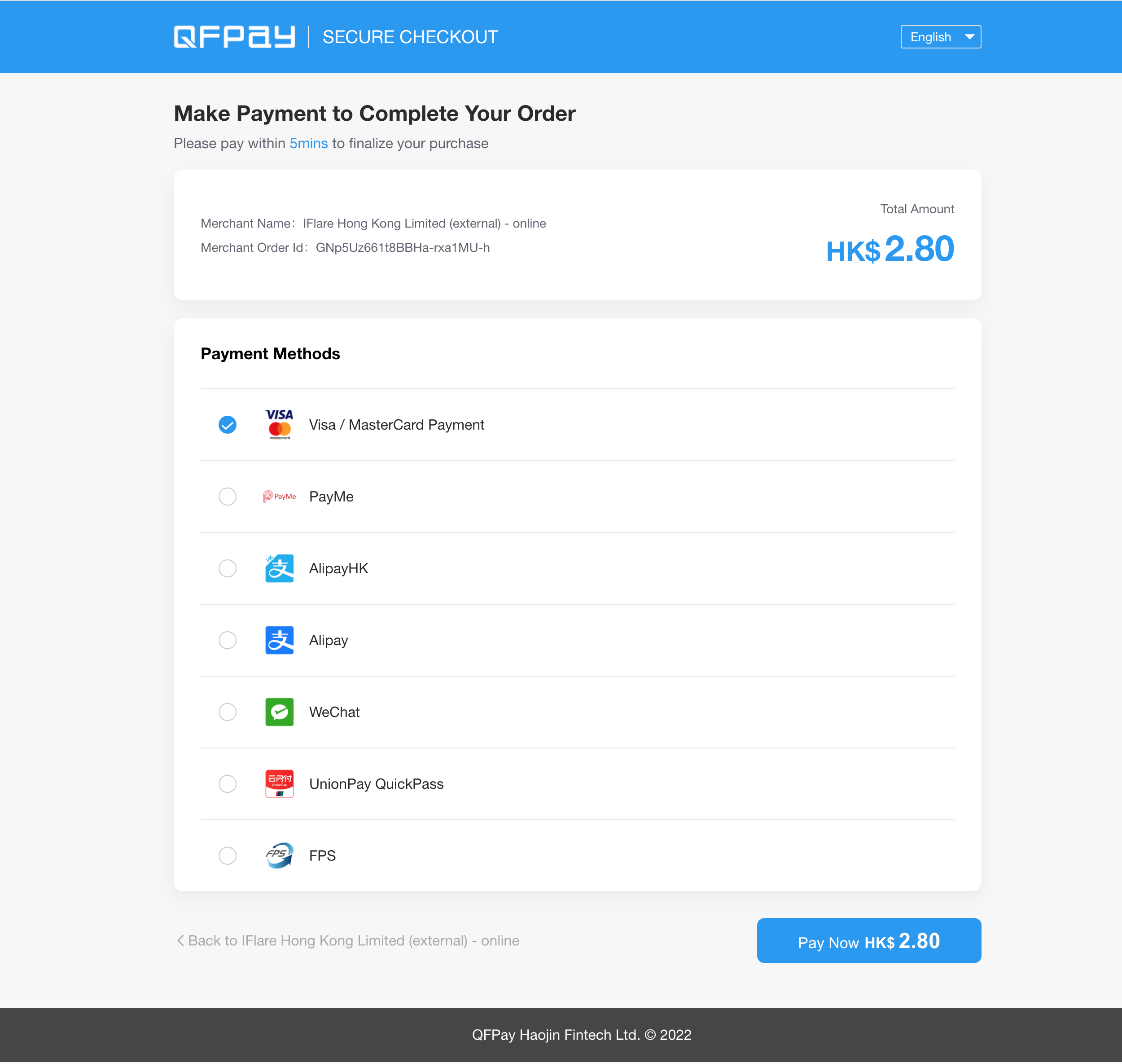 收銀台頁面具備響應式設計,可自動適配不同裝置與螢幕尺寸。
### 語言支援
可透過 `lang` 參數控制顯示語言:
* `zh-hk`:繁體中文
* `zh-cn`:簡體中文
* `en`:英文
***
## 可客製化項目(Customisation)
若你希望收銀台頁面更貼合商戶品牌或特定營運需求,可向 QFPay 申請客製化(由技術支援協助配置)。
常見可客製化內容包括:
* **可顯示 / 預設的錢包選項**(例如只開放特定錢包、調整顯示順序)
* **頁面視覺樣式**(例如品牌色、Logo、按鈕樣式、版面細節)
* **付款說明 / 提示文字**(例如顯示特定政策、客服資訊、付款指引)
* **回跳文案與按鈕行為**(例如「返回商店」按鈕導向、顯示文字)
如需客製化,請聯絡 `technical.support@qfpay.com`,並提供:
1. 商戶資訊(`mchntid` / `appcode`)
2. 期望客製化項目(用條列列出)
3. 如有 UI 參考(截圖 / Figma / 網站連結)一併附上
***
## API 環境
測試交易完成後,請立即透過商戶後台、QFPay App 或 API 進行退款。
環境設定請參考:[環境設定](/zh-hant/integration/preparation/environments)
***
## 結帳流程
收銀台頁面具備響應式設計,可自動適配不同裝置與螢幕尺寸。
### 語言支援
可透過 `lang` 參數控制顯示語言:
* `zh-hk`:繁體中文
* `zh-cn`:簡體中文
* `en`:英文
***
## 可客製化項目(Customisation)
若你希望收銀台頁面更貼合商戶品牌或特定營運需求,可向 QFPay 申請客製化(由技術支援協助配置)。
常見可客製化內容包括:
* **可顯示 / 預設的錢包選項**(例如只開放特定錢包、調整顯示順序)
* **頁面視覺樣式**(例如品牌色、Logo、按鈕樣式、版面細節)
* **付款說明 / 提示文字**(例如顯示特定政策、客服資訊、付款指引)
* **回跳文案與按鈕行為**(例如「返回商店」按鈕導向、顯示文字)
如需客製化,請聯絡 `technical.support@qfpay.com`,並提供:
1. 商戶資訊(`mchntid` / `appcode`)
2. 期望客製化項目(用條列列出)
3. 如有 UI 參考(截圖 / Figma / 網站連結)一併附上
***
## API 環境
測試交易完成後,請立即透過商戶後台、QFPay App 或 API 進行退款。
環境設定請參考:[環境設定](/zh-hant/integration/preparation/environments)
***
## 結帳流程
 1. 用戶在商戶網站點擊「付款」
2. 商戶將用戶導向 QFPay Checkout URL
3. 用戶在收銀台選擇錢包並完成付款
4. 付款完成後,頁面跳轉至 `return_url`(成功)或 `failed_url`(失敗)
5. 商戶系統透過 `notify_url` 接收非同步通知,或使用查詢 API 做最終確認
***
## Checkout URL
* **端點**:`https:///checkstand/#/?`
* **方法**:`GET`
***
## 請求參數
| 欄位 | 類型 | 必填 | 描述 |
| ----------------------- | ----------- | -- | -------------------------------------------------------- |
| `appcode` | String(64) | 是 | QFPay 分配的憑證 |
| `sign_type` | String(256) | 是 | 簽名類型,建議使用 `sha256` |
| `sign` | String(128) | 是 | 簽名值 |
| `paysource` | String(12) | 是 | 請使用以 `_checkout` 結尾的來源標識,例如 `remotepay_checkout` |
| `txamt` | Int(11) | 是 | 交易金額(單位:分),建議 > 200 |
| `txcurrcd` | String(3) | 是 | 貨幣代碼,例如 `HKD` |
| `out_trade_no` | String(128) | 是 | 商戶自訂交易單號(必須唯一) |
| `txdtm` | String(32) | 是 | 交易時間,格式:`YYYY-MM-DD HH:mm:ss` |
| `return_url` | String(256) | 是 | 付款成功後跳轉連結 |
| `failed_url` | String(256) | 是 | 付款失敗後跳轉連結 |
| `notify_url` | String(256) | 是 | 非同步通知連結 |
| `mchntid` | String(16) | 否 | 商戶代碼(代理商需填) |
| `goods_name` | String(64) | 否 | 商品名稱(避免特殊字元,建議 ≤ 20 字) |
| `udid` | String(40) | 否 | 裝置代碼 |
| `expired_time` | String(3) | 否 | 二維碼有效時間(分鐘,5–120) |
| `checkout_expired_time` | String(13) | 否 | 結帳頁逾時:秒數(最多 3 位,例如 `120`)或 13 位毫秒時間戳(例如 `1715686118000`) |
| `limit_pay` | String(3) | 否 | 禁用信用卡(僅 WeChat Pay 支援) |
| `lang` | String(5) | 否 | 語言:`zh-hk` / `zh-cn` / `en` |
| `cancel_url` | String(256) | 否 | 結帳頁「返回商店」按鈕導向 |
每筆訂單請使用唯一的 `out_trade_no`。
***
## 建立結帳訂單
商戶需將參數按規則排序並計算 `sign`,再導向組好的 Checkout URL。
如需完整範例可下載: [QFPay Online Checkout Boilerplate](/files/qfpay_online_checkout.zip)
***
## 程式碼範例
```html HTML theme={null}
checkout
QFPay Online Checkout
```
1. 用戶在商戶網站點擊「付款」
2. 商戶將用戶導向 QFPay Checkout URL
3. 用戶在收銀台選擇錢包並完成付款
4. 付款完成後,頁面跳轉至 `return_url`(成功)或 `failed_url`(失敗)
5. 商戶系統透過 `notify_url` 接收非同步通知,或使用查詢 API 做最終確認
***
## Checkout URL
* **端點**:`https:///checkstand/#/?`
* **方法**:`GET`
***
## 請求參數
| 欄位 | 類型 | 必填 | 描述 |
| ----------------------- | ----------- | -- | -------------------------------------------------------- |
| `appcode` | String(64) | 是 | QFPay 分配的憑證 |
| `sign_type` | String(256) | 是 | 簽名類型,建議使用 `sha256` |
| `sign` | String(128) | 是 | 簽名值 |
| `paysource` | String(12) | 是 | 請使用以 `_checkout` 結尾的來源標識,例如 `remotepay_checkout` |
| `txamt` | Int(11) | 是 | 交易金額(單位:分),建議 > 200 |
| `txcurrcd` | String(3) | 是 | 貨幣代碼,例如 `HKD` |
| `out_trade_no` | String(128) | 是 | 商戶自訂交易單號(必須唯一) |
| `txdtm` | String(32) | 是 | 交易時間,格式:`YYYY-MM-DD HH:mm:ss` |
| `return_url` | String(256) | 是 | 付款成功後跳轉連結 |
| `failed_url` | String(256) | 是 | 付款失敗後跳轉連結 |
| `notify_url` | String(256) | 是 | 非同步通知連結 |
| `mchntid` | String(16) | 否 | 商戶代碼(代理商需填) |
| `goods_name` | String(64) | 否 | 商品名稱(避免特殊字元,建議 ≤ 20 字) |
| `udid` | String(40) | 否 | 裝置代碼 |
| `expired_time` | String(3) | 否 | 二維碼有效時間(分鐘,5–120) |
| `checkout_expired_time` | String(13) | 否 | 結帳頁逾時:秒數(最多 3 位,例如 `120`)或 13 位毫秒時間戳(例如 `1715686118000`) |
| `limit_pay` | String(3) | 否 | 禁用信用卡(僅 WeChat Pay 支援) |
| `lang` | String(5) | 否 | 語言:`zh-hk` / `zh-cn` / `en` |
| `cancel_url` | String(256) | 否 | 結帳頁「返回商店」按鈕導向 |
每筆訂單請使用唯一的 `out_trade_no`。
***
## 建立結帳訂單
商戶需將參數按規則排序並計算 `sign`,再導向組好的 Checkout URL。
如需完整範例可下載: [QFPay Online Checkout Boilerplate](/files/qfpay_online_checkout.zip)
***
## 程式碼範例
```html HTML theme={null}
checkout
QFPay Online Checkout
```