> ## Documentation Index
> Fetch the complete documentation index at: https://sdk.qfapi.com/llms.txt
> Use this file to discover all available pages before exploring further.
# Online Pre-authorisation API
> This document explains how to use QFPay's pre-authorisation APIs to freeze funds, capture payments, unfreeze unused amounts, and issue refunds.
Pre-authorisation allows merchants to **freeze a specific amount of customer funds** without immediately charging. The merchant can then **capture (charge)** the full or partial amount within a set period or **unfreeze** the remaining amount if not used.
***
## When to Use Pre-authorisation
Pre-authorisation is especially useful in scenarios where the final charge amount is not confirmed upfront or the service is provided later:
* **Hotel bookings**: Freeze a deposit at check-in, charge final amount at checkout
* **Car or equipment rental**: Freeze a guarantee or holding amount at pickup
* **E-commerce with delayed shipment**: Reserve funds on order, charge on dispatch
* **Subscriptions or deferred services**: Verify funding ability before providing service
* **High-risk or variable pricing cases**: Avoid payment failures and fraud
***
## Valid Capture Period
Depending on your industry and channel, different maximum capture periods are supported:
| Industry Type | Max Capture Window |
| ----------------- | ------------------ |
| General merchants | Up to **7 days** |
| Hotels / Rentals | Up to **28 days** |
Actual capture duration is subject to your agreement with QFPay and the payment channel’s capability. Please confirm before go-live.
***
## Key APIs
Please first familiarise yourself with:
* [API Usage Guidelines](/integration/api-reference/api-usage-guidelines)
* [API credentials](/integration/preparation/credentials-and-merchant-structure)
* [Test vs Production environment](/integration/preparation/environments)
* [Signature generation method](/integration/preparation/authentication-and-signature)
* [Common error codes and resolution](/integration/api-reference/status-codes)
Other relevant APIs:
* [Transaction Enquiry](/integration/common-api/transaction-enquiry)
* [Refund API](/integration/common-api/refund)
***
## Pre-authorisation Flow
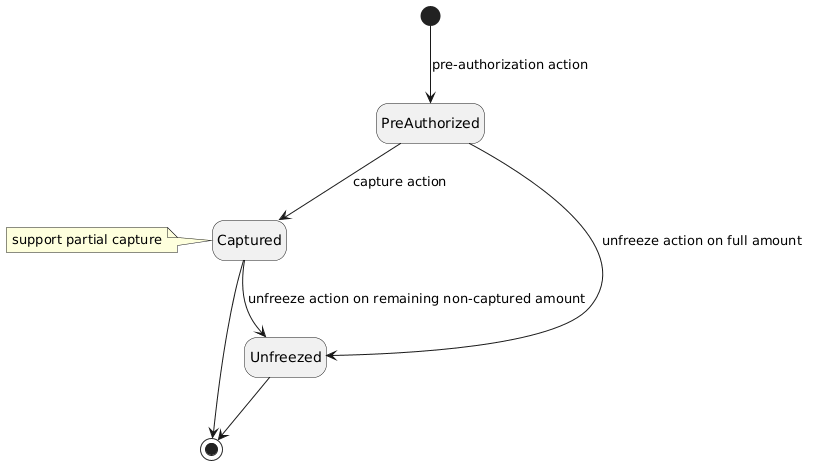
***
## Step 1: Create Pre-authorised Transaction
This step is handled via **Payment Element SDK** and involves freezing the customer's funds.
No actual deduction happens at this stage.
Please refer to the [Payment Element Integration Guide](/integration/online-shop/checkout-integration/payment-element) for front-end SDK usage.
***
## Step 2: Capture (Deduct) Funds
Within the valid capture window, merchants can **charge** part or all of the frozen amount.
Multiple partial captures are allowed, but the **total cannot exceed the authorised amount**.
**Endpoint**: `POST /trade/v1/authtrade`
### Headers
| Header | Required | Description |
| -------------- | -------- | ------------- |
| `X-QF-APPCODE` | Yes | Your App Code |
| `X-QF-SIGN` | Yes | API Signature |
### Request Parameters
| Parameter | Required | Description |
| ---------- | -------- | ---------------------------------------- |
| `txamt` | Yes | Amount to capture (suggested > 200) |
| `txcurrcd` | No | Currency code |
| `mchid` | No | Merchant ID (for specific channels only) |
| `syssn` | Yes | Original pre-auth system order number |
### Example Response
```json theme={null}
{
"sysdtm": "2024-02-26 15:04:12",
"paydtm": "2024-02-26 15:04:12",
"udid": "qiantai2",
"txcurrcd": "HKD",
"txdtm": "2024-02-26 07:04:11",
"txamt": "500",
"resperr": "交易成功",
"respmsg": "Capture received",
"out_trade_no": "",
"syssn": "20240226180500020000014116",
"orig_syssn": "20240226180500020000014079",
"respcd": "0000",
"chnlsn": "",
"cardcd": ""
}
```
***
## Unfreeze Remaining Funds
Unused funds from a pre-authorised transaction can be **unfrozen** and returned to the customer.
* Only the *un-captured* amount can be unfrozen.
* **Unfreeze can only be done ONCE**.
* After unfreeze, no further capture can be made.
**Endpoint**: `POST /trade/v1/unfreeze`
### Request Parameters
| Parameter | Required | Description |
| -------------- | -------- | ------------------------------------- |
| `txamt` | Yes | Amount to unfreeze |
| `txdtm` | Yes | Timestamp of the unfreeze |
| `syssn` | Yes | Original pre-auth system order number |
| `out_trade_no` | Yes | Original merchant order number |
| `mchid` | No | Merchant ID (if applicable) |
### Example Response
```json theme={null}
{
"sysdtm": "2024-02-26 17:17:05",
"paydtm": "2024-02-26 17:17:06",
"udid": "qiantai2",
"txcurrcd": "HKD",
"txdtm": "2024-02-26 09:17:05",
"txamt": "2000",
"resperr": "交易成功",
"respmsg": "Void received",
"out_trade_no": "",
"syssn": "20240226180500020000014222",
"orig_syssn": "20240226180500020000014220",
"respcd": "0000",
"chnlsn": "",
"cardcd": ""
}
```
***
## Refund for Captured Payments
If the customer has already been charged (via capture), a refund can be initiated using the [Refund API](/integration/common-api/refund).
Use the `syssn` from the **capture step** (not the original pre-authorisation) when issuing the refund.
***
## Async Notification
All major actions trigger standard webhook notifications:
| Operation | `notify_type` value |
| --------- | ------------------- |
| Capture | `payment` |
| Unfreeze | `unfreeze` |
| Refund | `refund` |
### Notification Sample
```json theme={null}
{
"status": "1",
"pay_type": "800101",
"sysdtm": "2020-05-14 12:32:56",
"paydtm": "2020-05-14 12:33:56",
"goods_name": "",
"txcurrcd": "HKD",
"txdtm": "2020-05-14 12:32:56",
"mchid": "",
"txamt": "10",
"exchange_rate": "",
"chnlsn2": "",
"out_trade_no": "YEPE7WTW46NVU30JW5N90H7DHD94N56B",
"syssn": "20200514000300020093755455",
"cash_fee_type": "",
"cancel": "0",
"respcd": "0000",
"goods_info": "",
"cash_fee": "0",
"notify_type": "payment",
"chnlsn": "",
"cardcd": ""
}
```
***
## Best Practices & Warnings
If you do **not** perform capture within the allowed time, the frozen funds will **automatically unfreeze**.\
Failure to capture may result in lost revenue if the customer revokes authorisation or their account balance changes.
Capture, unfreeze, and refund operations can be performed via:
* API calls
* QFPay merchant portal
***