> ## Documentation Index
> Fetch the complete documentation index at: https://sdk.qfapi.com/llms.txt
> Use this file to discover all available pages before exploring further.
# WeChat QR Code Payment
> This guide helps merchants integrate WeChat online QR Code payments, including QR generation, verification, and timeout settings.
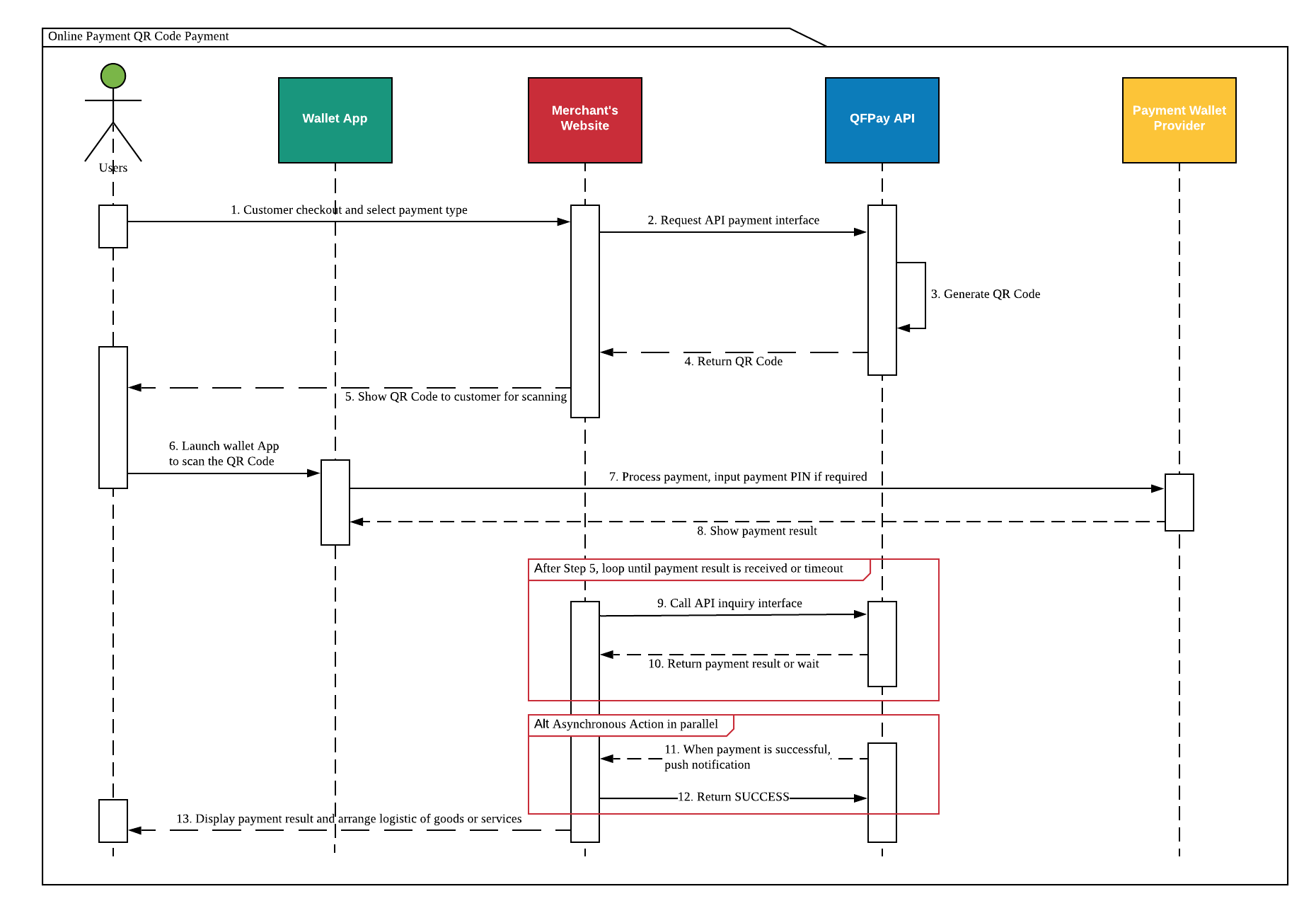 ## Overview
WeChat QR Code payment allows customers to use **WeChat’s Scan feature** to scan a QR code generated by the merchant system and complete payment.
### Typical flow
* Merchant generates a payment QR code
* Customer scans using WeChat
* WeChat performs security verification
* Payment completes in the wallet
### Common scenarios
* Desktop checkout pages
* POS display screens
* Self-service kiosks
***
## Real-name Verification (Optional)
Real-name verification is currently available only for **Mainland China citizens**.
If enabled, the merchant must submit:
* payer’s legal name
* Chinese national ID number
Rules:
* Wallet information must match provided identity data
* Payment still succeeds if the customer has not linked a bank card
* Enforcement depends on merchant configuration
***
## Create Payment Request
### HTTP Request
* **Method:** POST
* **Endpoint:** `/trade/v1/payment`
* **PayType:** `800201` (WeChat QR Payment)
***
## Sample Code
All examples follow the same logic. Choose the language matching your backend.
```python theme={null}
import hashlib, requests, datetime
environment = "https://test-openapi-hk.qfapi.com"
app_code = "YOUR_APP_CODE"
client_key = "YOUR_CLIENT_KEY"
def sign(data, key):
s = "&".join(f"{k}={data[k]}" for k in sorted(data))
return hashlib.md5((s + key).encode()).hexdigest().upper()
payload = {
"txamt": "300",
"txcurrcd": "HKD",
"pay_type": "800201",
"out_trade_no": "ORDER123456",
"txdtm": datetime.datetime.now().strftime("%Y-%m-%d %H:%M:%S")
}
headers = {
"X-QF-APPCODE": app_code,
"X-QF-SIGN": sign(payload, client_key)
}
r = requests.post(environment + "/trade/v1/payment", data=payload, headers=headers)
print(r.json())
```
```javascript theme={null}
const crypto = require("crypto");
const request = require("request");
const payload = {
txamt: "300",
txcurrcd: "HKD",
pay_type: "800201",
out_trade_no: "ORDER123456",
txdtm: "2026-01-01 12:00:00"
};
const key = "YOUR_CLIENT_KEY";
const signString = Object.keys(payload).sort().map(k => `${k}=${payload[k]}`).join("&") + key;
const sign = crypto.createHash("md5").update(signString).digest("hex").toUpperCase();
request.post({
url: "https://test-openapi-hk.qfapi.com/trade/v1/payment",
form: payload,
headers: {
"X-QF-APPCODE": "YOUR_APP_CODE",
"X-QF-SIGN": sign
}
}, (err, res, body) => console.log(body));
```
```php theme={null}
"300",
"txcurrcd" => "HKD",
"pay_type" => "800201",
"out_trade_no" => "ORDER123456",
"txdtm" => date("Y-m-d H:i:s")
];
$headers = [
"X-QF-APPCODE: YOUR_APP_CODE",
"X-QF-SIGN: " . sign($payload, "YOUR_CLIENT_KEY")
];
$ch = curl_init("https://test-openapi-hk.qfapi.com/trade/v1/payment");
curl_setopt($ch, CURLOPT_POST, true);
curl_setopt($ch, CURLOPT_POSTFIELDS, http_build_query($payload));
curl_setopt($ch, CURLOPT_HTTPHEADER, $headers);
curl_setopt($ch, CURLOPT_RETURNTRANSFER, true);
echo curl_exec($ch);
curl_close($ch);
?>
```
***
## API Response
On success, the API returns a **QR code URL**.
Render the `qrcode` value into an image for customers to scan.
```json theme={null}
{
"respcd": "0000",
"resperr": "success",
"qrcode": "weixin://wxpay/bizpayurl?pr=ABC123",
"syssn": "20260101000100020012345678",
"out_trade_no": "ORDER123456"
}
```
***
## Request Parameters
| Parameter | Required | Description |
| -------------- | -------- | --------------------------- |
| `txamt` | Yes | Amount in cents |
| `txcurrcd` | Yes | Currency code |
| `pay_type` | Yes | Must be `800201` |
| `out_trade_no` | Yes | Unique order ID |
| `txdtm` | Yes | Timestamp |
| `expired_time` | No | QR expiry (5–120 min) |
| `goods_name` | No | Product name |
| `mchid` | No | Required for agent setups |
| `extend_info` | No | Real-name verification data |
***
## Response Fields
| Field | Description |
| -------------- | -------------------- |
| `qrcode` | QR code URL |
| `respcd` | `0000` = success |
| `resperr` | status message |
| `syssn` | QFPay transaction ID |
| `out_trade_no` | merchant order ID |
If `respcd` = **1143** or **1145**, the transaction is pending.\
Call the Transaction Enquiry API to confirm final status.
***
## Summary
* Designed for desktop & POS QR display
* Convert returned `qrcode` to a scannable image
* Real-name verification is optional
* Always implement order enquiry fallback
***
## Overview
WeChat QR Code payment allows customers to use **WeChat’s Scan feature** to scan a QR code generated by the merchant system and complete payment.
### Typical flow
* Merchant generates a payment QR code
* Customer scans using WeChat
* WeChat performs security verification
* Payment completes in the wallet
### Common scenarios
* Desktop checkout pages
* POS display screens
* Self-service kiosks
***
## Real-name Verification (Optional)
Real-name verification is currently available only for **Mainland China citizens**.
If enabled, the merchant must submit:
* payer’s legal name
* Chinese national ID number
Rules:
* Wallet information must match provided identity data
* Payment still succeeds if the customer has not linked a bank card
* Enforcement depends on merchant configuration
***
## Create Payment Request
### HTTP Request
* **Method:** POST
* **Endpoint:** `/trade/v1/payment`
* **PayType:** `800201` (WeChat QR Payment)
***
## Sample Code
All examples follow the same logic. Choose the language matching your backend.
```python theme={null}
import hashlib, requests, datetime
environment = "https://test-openapi-hk.qfapi.com"
app_code = "YOUR_APP_CODE"
client_key = "YOUR_CLIENT_KEY"
def sign(data, key):
s = "&".join(f"{k}={data[k]}" for k in sorted(data))
return hashlib.md5((s + key).encode()).hexdigest().upper()
payload = {
"txamt": "300",
"txcurrcd": "HKD",
"pay_type": "800201",
"out_trade_no": "ORDER123456",
"txdtm": datetime.datetime.now().strftime("%Y-%m-%d %H:%M:%S")
}
headers = {
"X-QF-APPCODE": app_code,
"X-QF-SIGN": sign(payload, client_key)
}
r = requests.post(environment + "/trade/v1/payment", data=payload, headers=headers)
print(r.json())
```
```javascript theme={null}
const crypto = require("crypto");
const request = require("request");
const payload = {
txamt: "300",
txcurrcd: "HKD",
pay_type: "800201",
out_trade_no: "ORDER123456",
txdtm: "2026-01-01 12:00:00"
};
const key = "YOUR_CLIENT_KEY";
const signString = Object.keys(payload).sort().map(k => `${k}=${payload[k]}`).join("&") + key;
const sign = crypto.createHash("md5").update(signString).digest("hex").toUpperCase();
request.post({
url: "https://test-openapi-hk.qfapi.com/trade/v1/payment",
form: payload,
headers: {
"X-QF-APPCODE": "YOUR_APP_CODE",
"X-QF-SIGN": sign
}
}, (err, res, body) => console.log(body));
```
```php theme={null}
"300",
"txcurrcd" => "HKD",
"pay_type" => "800201",
"out_trade_no" => "ORDER123456",
"txdtm" => date("Y-m-d H:i:s")
];
$headers = [
"X-QF-APPCODE: YOUR_APP_CODE",
"X-QF-SIGN: " . sign($payload, "YOUR_CLIENT_KEY")
];
$ch = curl_init("https://test-openapi-hk.qfapi.com/trade/v1/payment");
curl_setopt($ch, CURLOPT_POST, true);
curl_setopt($ch, CURLOPT_POSTFIELDS, http_build_query($payload));
curl_setopt($ch, CURLOPT_HTTPHEADER, $headers);
curl_setopt($ch, CURLOPT_RETURNTRANSFER, true);
echo curl_exec($ch);
curl_close($ch);
?>
```
***
## API Response
On success, the API returns a **QR code URL**.
Render the `qrcode` value into an image for customers to scan.
```json theme={null}
{
"respcd": "0000",
"resperr": "success",
"qrcode": "weixin://wxpay/bizpayurl?pr=ABC123",
"syssn": "20260101000100020012345678",
"out_trade_no": "ORDER123456"
}
```
***
## Request Parameters
| Parameter | Required | Description |
| -------------- | -------- | --------------------------- |
| `txamt` | Yes | Amount in cents |
| `txcurrcd` | Yes | Currency code |
| `pay_type` | Yes | Must be `800201` |
| `out_trade_no` | Yes | Unique order ID |
| `txdtm` | Yes | Timestamp |
| `expired_time` | No | QR expiry (5–120 min) |
| `goods_name` | No | Product name |
| `mchid` | No | Required for agent setups |
| `extend_info` | No | Real-name verification data |
***
## Response Fields
| Field | Description |
| -------------- | -------------------- |
| `qrcode` | QR code URL |
| `respcd` | `0000` = success |
| `resperr` | status message |
| `syssn` | QFPay transaction ID |
| `out_trade_no` | merchant order ID |
If `respcd` = **1143** or **1145**, the transaction is pending.\
Call the Transaction Enquiry API to confirm final status.
***
## Summary
* Designed for desktop & POS QR display
* Convert returned `qrcode` to a scannable image
* Real-name verification is optional
* Always implement order enquiry fallback
***