> ## Documentation Index
> Fetch the complete documentation index at: https://sdk.qfapi.com/llms.txt
> Use this file to discover all available pages before exploring further.
# WeChat In-App Payments (Native App)
> This document explains how to integrate WeChat In-App payments using the official SDK within iOS or Android apps.
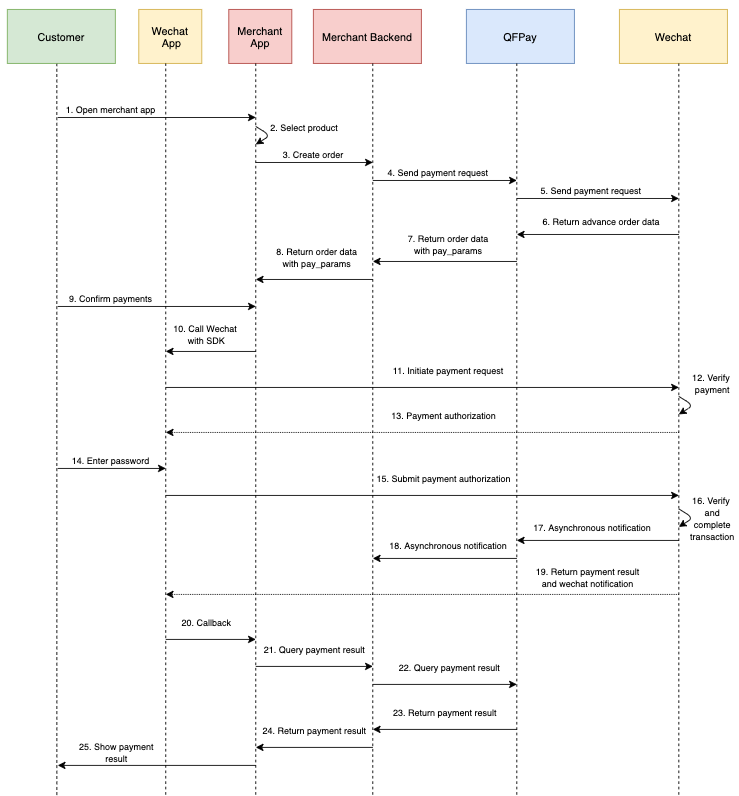 ## Prerequisites
To use WeChat In-App payments, merchants must:
* Register on the **WeChat Open Platform**
* Create an App and obtain an **AppID**
* Complete WeChat approval and onboarding
More details:\
[WeChat Official In-App Payment Guide](https://pay.weixin.qq.com/wiki/doc/api/wxpay/en/pay/In-AppPay/chapter6_2.shtml#menu1)
***
## Real-name Verification (Optional)
Merchants may enable **real-name verification**.
* Applies to Mainland China users only
* The WeChat Wallet identity must match submitted details
* Users can still pay without linking a bank card
* Availability depends on merchant configuration and PayType support
***
## SDK Downloads
Download the official SDK:
[WeChat SDK Download Page](https://developers.weixin.qq.com/doc/oplatform/Downloads/iOS_Resource.html)
***
## API Request
### HTTP Request
* **Method:** POST
* **Endpoint:** `/trade/v1/payment`
* **PayType:** `800210`
Confirm the PayType with QFPay if your account uses a different code for WeChat In-App payments.
***
### Request Parameters
| Field | Param | Required | Type | Description |
| ----------------- | -------------- | -------- | --------- | ------------------------------------------------------------------------- |
| Merchant ID | `mchid` | No | String | Store-level merchant ID (if provided) |
| External Order ID | `out_trade_no` | Yes | String | Unique transaction reference |
| Amount | `txamt` | Yes | Int | Amount in cents (recommended > 200 to avoid risk flags) |
| Currency | `txcurrcd` | Yes | String(3) | Currency code. See [Currency List](/integration/api-reference/currencies) |
| RMB Tag | `rmb_tag` | No | String(1) | Use with `txcurrcd=CNY` to indicate RMB |
| Transaction Time | `txdtm` | Yes | String | `YYYY-MM-DD hh:mm:ss` |
| Device ID | `udid` | No | String | Mobile device identifier |
| Return URL | `return_url` | No | String | Required for some channels |
| Real-name Info | `extend_info` | No | Object | Required only for Mainland China real-name flow |
| … | | | | See **Common Parameters** for shared request fields |
***
### Real-Name Verification Format (`extend_info`)
Submit real-name verification information only when required for Mainland China flows.
```json theme={null}
{
"user_creid": "430067798868676871",
"user_truename": "\\u5c0f\\u6797"
}
```
* `user_creid` — Mainland China ID number
* `user_truename` — payer’s real name (Unicode or Chinese characters)
***
### Sample Request
```json theme={null}
{
"goods_info": "test_app",
"goods_name": "qfpay",
"out_trade_no": "ORDER_10001",
"pay_type": "800210",
"txamt": "10",
"txcurrcd": "HKD",
"txdtm": "2019-09-13 04:53:03",
"udid": "DEVICE123"
}
```
***
## API Response
### Response Parameters
| Param | Type | Description |
| -------------- | ------ | -------------------------- |
| `syssn` | String | QFPay transaction ID |
| `out_trade_no` | String | Merchant order reference |
| `txdtm` | String | Request time |
| `txamt` | Int | Amount |
| `sysdtm` | String | Processing time |
| `respcd` | String | `0000` = success |
| `respmsg` | String | Response message |
| `resperr` | String | Error description |
| `cardcd` | String | Card number (if available) |
| `txcurrcd` | String | Currency |
| `pay_params` | Object | Parameters for WeChat SDK |
***
### Sample Response
```json theme={null}
{
"respcd": "0000",
"respmsg": "",
"pay_params": {
"appid": "wx3c6896fa9b351f2a",
"partnerid": "316525492",
"prepayid": "wx131253044253463a81dc336e1254149882",
"package": "Sign=WXPay",
"noncestr": "7786db42d9a245c2b1cfc717ac59376e",
"timestamp": 1568350384,
"sign": "[sign string]"
}
}
```
***
## Calling the WeChat SDK
After receiving `pay_params`, pass the values into the WeChat SDK.
[Official Documentation](https://pay.weixin.qq.com/wiki/doc/api/app/app.php?chapter=9_12\&index=2)
### Required Parameter Mapping
* `appid`
* `partnerid`
* `prepayid`
* `package`
* `noncestr`
* `timestamp`
* `sign`
***
## Summary
* Designed for **native mobile apps only**
* Requires WeChat Open Platform registration & AppID approval
* Payment flow is handled by the official WeChat SDK
* Always confirm final status using the [Transaction Enquiry API](/integration/common-api/transaction-enquiry)
## Prerequisites
To use WeChat In-App payments, merchants must:
* Register on the **WeChat Open Platform**
* Create an App and obtain an **AppID**
* Complete WeChat approval and onboarding
More details:\
[WeChat Official In-App Payment Guide](https://pay.weixin.qq.com/wiki/doc/api/wxpay/en/pay/In-AppPay/chapter6_2.shtml#menu1)
***
## Real-name Verification (Optional)
Merchants may enable **real-name verification**.
* Applies to Mainland China users only
* The WeChat Wallet identity must match submitted details
* Users can still pay without linking a bank card
* Availability depends on merchant configuration and PayType support
***
## SDK Downloads
Download the official SDK:
[WeChat SDK Download Page](https://developers.weixin.qq.com/doc/oplatform/Downloads/iOS_Resource.html)
***
## API Request
### HTTP Request
* **Method:** POST
* **Endpoint:** `/trade/v1/payment`
* **PayType:** `800210`
Confirm the PayType with QFPay if your account uses a different code for WeChat In-App payments.
***
### Request Parameters
| Field | Param | Required | Type | Description |
| ----------------- | -------------- | -------- | --------- | ------------------------------------------------------------------------- |
| Merchant ID | `mchid` | No | String | Store-level merchant ID (if provided) |
| External Order ID | `out_trade_no` | Yes | String | Unique transaction reference |
| Amount | `txamt` | Yes | Int | Amount in cents (recommended > 200 to avoid risk flags) |
| Currency | `txcurrcd` | Yes | String(3) | Currency code. See [Currency List](/integration/api-reference/currencies) |
| RMB Tag | `rmb_tag` | No | String(1) | Use with `txcurrcd=CNY` to indicate RMB |
| Transaction Time | `txdtm` | Yes | String | `YYYY-MM-DD hh:mm:ss` |
| Device ID | `udid` | No | String | Mobile device identifier |
| Return URL | `return_url` | No | String | Required for some channels |
| Real-name Info | `extend_info` | No | Object | Required only for Mainland China real-name flow |
| … | | | | See **Common Parameters** for shared request fields |
***
### Real-Name Verification Format (`extend_info`)
Submit real-name verification information only when required for Mainland China flows.
```json theme={null}
{
"user_creid": "430067798868676871",
"user_truename": "\\u5c0f\\u6797"
}
```
* `user_creid` — Mainland China ID number
* `user_truename` — payer’s real name (Unicode or Chinese characters)
***
### Sample Request
```json theme={null}
{
"goods_info": "test_app",
"goods_name": "qfpay",
"out_trade_no": "ORDER_10001",
"pay_type": "800210",
"txamt": "10",
"txcurrcd": "HKD",
"txdtm": "2019-09-13 04:53:03",
"udid": "DEVICE123"
}
```
***
## API Response
### Response Parameters
| Param | Type | Description |
| -------------- | ------ | -------------------------- |
| `syssn` | String | QFPay transaction ID |
| `out_trade_no` | String | Merchant order reference |
| `txdtm` | String | Request time |
| `txamt` | Int | Amount |
| `sysdtm` | String | Processing time |
| `respcd` | String | `0000` = success |
| `respmsg` | String | Response message |
| `resperr` | String | Error description |
| `cardcd` | String | Card number (if available) |
| `txcurrcd` | String | Currency |
| `pay_params` | Object | Parameters for WeChat SDK |
***
### Sample Response
```json theme={null}
{
"respcd": "0000",
"respmsg": "",
"pay_params": {
"appid": "wx3c6896fa9b351f2a",
"partnerid": "316525492",
"prepayid": "wx131253044253463a81dc336e1254149882",
"package": "Sign=WXPay",
"noncestr": "7786db42d9a245c2b1cfc717ac59376e",
"timestamp": 1568350384,
"sign": "[sign string]"
}
}
```
***
## Calling the WeChat SDK
After receiving `pay_params`, pass the values into the WeChat SDK.
[Official Documentation](https://pay.weixin.qq.com/wiki/doc/api/app/app.php?chapter=9_12\&index=2)
### Required Parameter Mapping
* `appid`
* `partnerid`
* `prepayid`
* `package`
* `noncestr`
* `timestamp`
* `sign`
***
## Summary
* Designed for **native mobile apps only**
* Requires WeChat Open Platform registration & AppID approval
* Payment flow is handled by the official WeChat SDK
* Always confirm final status using the [Transaction Enquiry API](/integration/common-api/transaction-enquiry)