> ## Documentation Index
> Fetch the complete documentation index at: https://sdk.qfapi.com/llms.txt
> Use this file to discover all available pages before exploring further.
# FPS App-to-App Integration
> Integration guide for FPS App-to-App and H5-to-App payments (Android & iOS)
This guide explains how a merchant mobile app or H5 page can launch supported bank apps to complete **FPS App-to-App payments**.
QFPay provides payment parameters via API. Your application then opens the user’s banking app using platform-specific methods. After payment, the result is returned via callback or backend verification.
Android and iOS platforms are supported.
***
## Integration Overview
Choose the flow that matches your application architecture:
| Platform | Flow Type | Usage Scenario | Launch Method |
| -------- | ---------- | --------------------------------- | -------------------------- |
| Android | Native App | App directly triggers FPS payment | `Intent` to bank app |
| Android | H5 to App | WebView triggers FPS payment | JSBridge + `Intent` |
| iOS | Native App | App directly triggers FPS payment | `UIActivityViewController` |
| iOS | H5 to App | WKWebView triggers FPS payment | WKWebView + JSBridge |
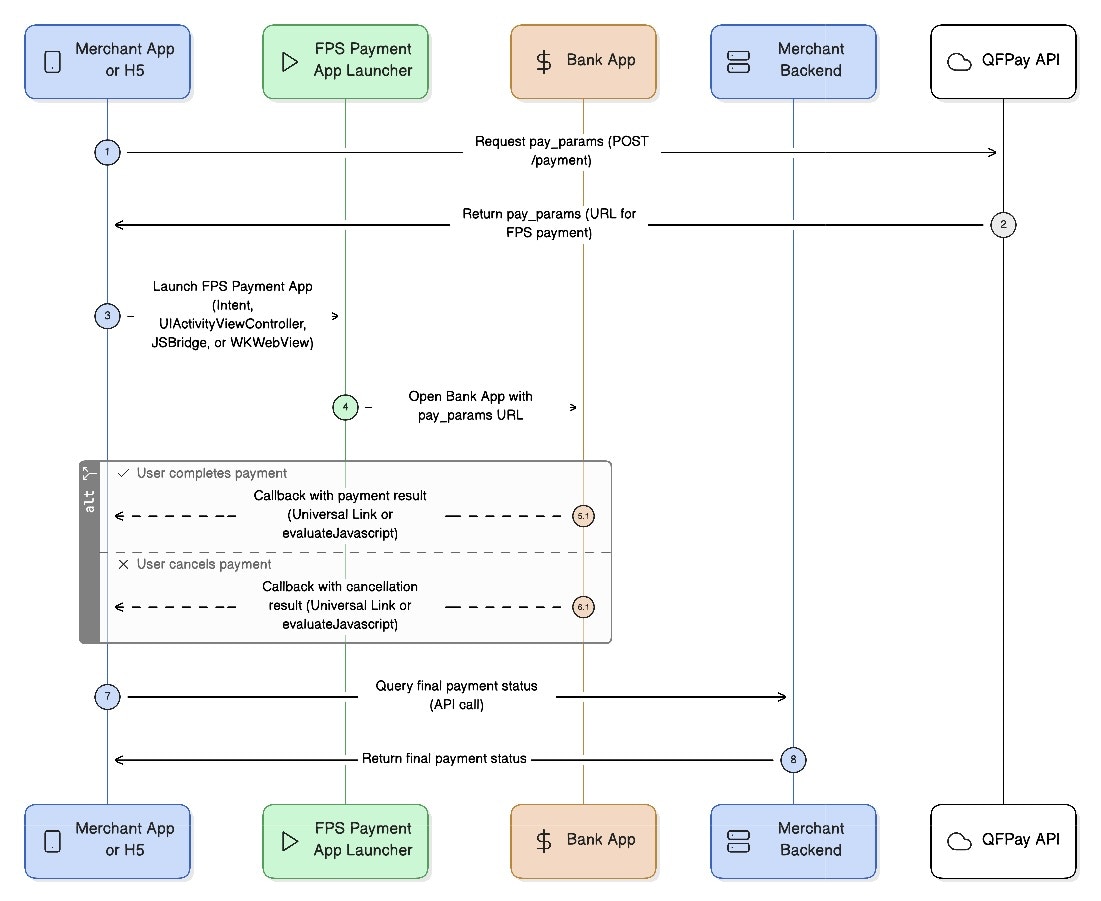
For all flows:
1. Retrieve payment parameters via API
2. Launch the FPS bank app
3. Receive callback or verify payment status
 ***
## 1. Retrieve Payment Parameters
**Endpoint**
`POST /trade/v1/payment`
**PayType:** `802010`
### Request Parameters
| Parameter | Required | Type | Description |
| -------------- | -------- | ------ | ------------------------------------------------------------------ |
| `pay_type` | Yes | String | Fixed value `802010` |
| `txamt` | Yes | Int | Amount in cents (100 = HKD 1.00) |
| `txdtm` | Yes | String | Format: `YYYY-MM-DD hh:mm:ss` |
| `out_trade_no` | Yes | String | Unique merchant order reference |
| … | — | — | See [Common Parameters](/integration/api-reference/request-format) |
If your FPS integration is via **HSBC direct channel**, you must obtain a **dedicated SSL certificate** matching your merchant legal name.
This is required for:
• secure callbacks (Universal Links / HTTPS redirects)\
• HSBC certification & production onboarding
See the FPS e-Cert setup guide for details.
### Response Parameters
| Name | Description |
| ---------------------- | -------------------------------------- |
| Common Response Fields | See response format documentation |
| `pay_params` | URL used to launch the FPS payment app |
***
## 2. Android FPS Payment Flow
### 2.1 Native App-to-App Flow
This flow launches the banking app directly using an Android Intent.
1. Retrieve `pay_params` from API
2. Launch bank app using Intent
3. Receive result via `onActivityResult`
4. Verify final status via backend
> Android Example
```java theme={null}
int REQUEST_CODE = 100;
String payUrl = "PAYMENT_URL_FROM_API";
Intent intent = new Intent("hk.com.hkicl");
intent.putExtra("url", payUrl);
startActivityForResult(intent, REQUEST_CODE);
@Override
public void onActivityResult(int requestCode, int resultCode, Intent data) {
if (requestCode == REQUEST_CODE) {
if (resultCode == RESULT_OK) {
// Payment initiated
} else if (resultCode == RESULT_CANCELED) {
// User cancelled or failed
}
}
}
```
***
### 2.2 Android H5-to-App (WebView)
Used when an H5 page inside WebView launches the FPS app.
**Flow**
1. Enable JavaScript in WebView
2. Register JS bridge
3. H5 sends payment URL to Android
4. Android launches bank app
5. Return result to H5
6. Verify payment via backend
H5 example:
```javascript theme={null}
AndroidBridge.handleMessage(JSON.stringify({
url: "PAYMENT_URL_FROM_API"
}));
```
***
## 3. iOS FPS Payment Flow
### 3.1 Native App-to-App Flow
iOS uses **UIActivityViewController** and App Extensions to launch bank apps.
**Flow**
1. Retrieve payment URL
2. Launch bank app via extension
3. User completes payment
4. App receives Universal Link callback
5. Verify status via backend
#### Key Steps
• Create `NSExtensionItem`\
• Package payment URL & callback URL\
• Use type identifier: `hk.com.hkicl`\
• Present `UIActivityViewController`
```swift theme={null}
let paymentPayload = [
"URL": paymentURL,
"callback": "https://your-domain.com/callback"
]
let itemProvider = NSItemProvider(
item: paymentPayload as NSDictionary,
typeIdentifier: "hk.com.hkicl"
)
let extensionItem = NSExtensionItem()
extensionItem.attachments = [itemProvider]
let activityVC = UIActivityViewController(
activityItems: [extensionItem],
applicationActivities: nil
)
present(activityVC, animated: true)
```
***
### 3.2 iOS H5-to-App via WKWebView
Used when FPS payment is triggered from an H5 page.
**Flow**
1. H5 retrieves payment URL
2. H5 calls native app via JSBridge
3. Native launches bank app
4. Native returns result to H5
5. Backend verifies final payment
Bridge call example:
```javascript theme={null}
window.webkit.messageHandlers.NativeBridge.postMessage({
action: "FPSH5CallApp",
params: { paymentRequestURL: "PAYMENT_URL_FROM_API" },
callbackId: "callback_123"
});
```
***
## Error Handling & Fallbacks
### Result Codes
| Code | Meaning |
| ---------------- | --------------------------------- |
| RESULT\_OK | Payment app launched successfully |
| RESULT\_CANCELED | Cancelled, failed, or timeout |
Always verify payment using your backend order query.
***
### If FPS App Is Not Installed
If no supported bank app is available:
• show an error message\
• provide fallback QR payment\
• allow retry
***
### Callback Failure
If callback or redirect fails:
• inform user payment is verifying\
• re-query backend after 3–5 seconds\
• display loading or retry option
***
## Demo Downloads
| Platform | Flow | Demo |
| -------- | ---------------- | -------------------------------------------------------------------------------------------------------------------------------------------------------- |
| Android | Native & WebView | [Download](/files/FPS%20h5%20app%20call%20app%20demo.zip) |
| iOS | Native (Obj-C) | [https://img-int.qfapi.com/upstatic/20251120c100/FPSDemo/FPSElement.zip](https://img-int.qfapi.com/upstatic/20251120c100/FPSDemo/FPSElement.zip) |
| iOS | Native (Swift) | [https://img-int.qfapi.com/upstatic/20251120c100/FPSDemo/FPSElementDemo.zip](https://img-int.qfapi.com/upstatic/20251120c100/FPSDemo/FPSElementDemo.zip) |
| iOS | JSBridge | [https://img-int.qfapi.com/upstatic/20251120c100/FPSDemo/fps-bridge.zip](https://img-int.qfapi.com/upstatic/20251120c100/FPSDemo/fps-bridge.zip) |
***
## 1. Retrieve Payment Parameters
**Endpoint**
`POST /trade/v1/payment`
**PayType:** `802010`
### Request Parameters
| Parameter | Required | Type | Description |
| -------------- | -------- | ------ | ------------------------------------------------------------------ |
| `pay_type` | Yes | String | Fixed value `802010` |
| `txamt` | Yes | Int | Amount in cents (100 = HKD 1.00) |
| `txdtm` | Yes | String | Format: `YYYY-MM-DD hh:mm:ss` |
| `out_trade_no` | Yes | String | Unique merchant order reference |
| … | — | — | See [Common Parameters](/integration/api-reference/request-format) |
If your FPS integration is via **HSBC direct channel**, you must obtain a **dedicated SSL certificate** matching your merchant legal name.
This is required for:
• secure callbacks (Universal Links / HTTPS redirects)\
• HSBC certification & production onboarding
See the FPS e-Cert setup guide for details.
### Response Parameters
| Name | Description |
| ---------------------- | -------------------------------------- |
| Common Response Fields | See response format documentation |
| `pay_params` | URL used to launch the FPS payment app |
***
## 2. Android FPS Payment Flow
### 2.1 Native App-to-App Flow
This flow launches the banking app directly using an Android Intent.
1. Retrieve `pay_params` from API
2. Launch bank app using Intent
3. Receive result via `onActivityResult`
4. Verify final status via backend
> Android Example
```java theme={null}
int REQUEST_CODE = 100;
String payUrl = "PAYMENT_URL_FROM_API";
Intent intent = new Intent("hk.com.hkicl");
intent.putExtra("url", payUrl);
startActivityForResult(intent, REQUEST_CODE);
@Override
public void onActivityResult(int requestCode, int resultCode, Intent data) {
if (requestCode == REQUEST_CODE) {
if (resultCode == RESULT_OK) {
// Payment initiated
} else if (resultCode == RESULT_CANCELED) {
// User cancelled or failed
}
}
}
```
***
### 2.2 Android H5-to-App (WebView)
Used when an H5 page inside WebView launches the FPS app.
**Flow**
1. Enable JavaScript in WebView
2. Register JS bridge
3. H5 sends payment URL to Android
4. Android launches bank app
5. Return result to H5
6. Verify payment via backend
H5 example:
```javascript theme={null}
AndroidBridge.handleMessage(JSON.stringify({
url: "PAYMENT_URL_FROM_API"
}));
```
***
## 3. iOS FPS Payment Flow
### 3.1 Native App-to-App Flow
iOS uses **UIActivityViewController** and App Extensions to launch bank apps.
**Flow**
1. Retrieve payment URL
2. Launch bank app via extension
3. User completes payment
4. App receives Universal Link callback
5. Verify status via backend
#### Key Steps
• Create `NSExtensionItem`\
• Package payment URL & callback URL\
• Use type identifier: `hk.com.hkicl`\
• Present `UIActivityViewController`
```swift theme={null}
let paymentPayload = [
"URL": paymentURL,
"callback": "https://your-domain.com/callback"
]
let itemProvider = NSItemProvider(
item: paymentPayload as NSDictionary,
typeIdentifier: "hk.com.hkicl"
)
let extensionItem = NSExtensionItem()
extensionItem.attachments = [itemProvider]
let activityVC = UIActivityViewController(
activityItems: [extensionItem],
applicationActivities: nil
)
present(activityVC, animated: true)
```
***
### 3.2 iOS H5-to-App via WKWebView
Used when FPS payment is triggered from an H5 page.
**Flow**
1. H5 retrieves payment URL
2. H5 calls native app via JSBridge
3. Native launches bank app
4. Native returns result to H5
5. Backend verifies final payment
Bridge call example:
```javascript theme={null}
window.webkit.messageHandlers.NativeBridge.postMessage({
action: "FPSH5CallApp",
params: { paymentRequestURL: "PAYMENT_URL_FROM_API" },
callbackId: "callback_123"
});
```
***
## Error Handling & Fallbacks
### Result Codes
| Code | Meaning |
| ---------------- | --------------------------------- |
| RESULT\_OK | Payment app launched successfully |
| RESULT\_CANCELED | Cancelled, failed, or timeout |
Always verify payment using your backend order query.
***
### If FPS App Is Not Installed
If no supported bank app is available:
• show an error message\
• provide fallback QR payment\
• allow retry
***
### Callback Failure
If callback or redirect fails:
• inform user payment is verifying\
• re-query backend after 3–5 seconds\
• display loading or retry option
***
## Demo Downloads
| Platform | Flow | Demo |
| -------- | ---------------- | -------------------------------------------------------------------------------------------------------------------------------------------------------- |
| Android | Native & WebView | [Download](/files/FPS%20h5%20app%20call%20app%20demo.zip) |
| iOS | Native (Obj-C) | [https://img-int.qfapi.com/upstatic/20251120c100/FPSDemo/FPSElement.zip](https://img-int.qfapi.com/upstatic/20251120c100/FPSDemo/FPSElement.zip) |
| iOS | Native (Swift) | [https://img-int.qfapi.com/upstatic/20251120c100/FPSDemo/FPSElementDemo.zip](https://img-int.qfapi.com/upstatic/20251120c100/FPSDemo/FPSElementDemo.zip) |
| iOS | JSBridge | [https://img-int.qfapi.com/upstatic/20251120c100/FPSDemo/fps-bridge.zip](https://img-int.qfapi.com/upstatic/20251120c100/FPSDemo/fps-bridge.zip) |