> ## Documentation Index
> Fetch the complete documentation index at: https://sdk.qfapi.com/llms.txt
> Use this file to discover all available pages before exploring further.
# Hosted Checkout Page
> Integrate QFPay’s hosted checkout to accept multiple payment methods using a secure prebuilt interface.
QFPay provides a prebuilt, secure checkout interface that allows merchants to accept multiple payment methods via simple redirection.
This solution:
* Requires minimal development effort
* Supports both desktop and mobile browsers
* Supports multi-language UI
* Is maintained and secured by QFPay
***
## UI Preview
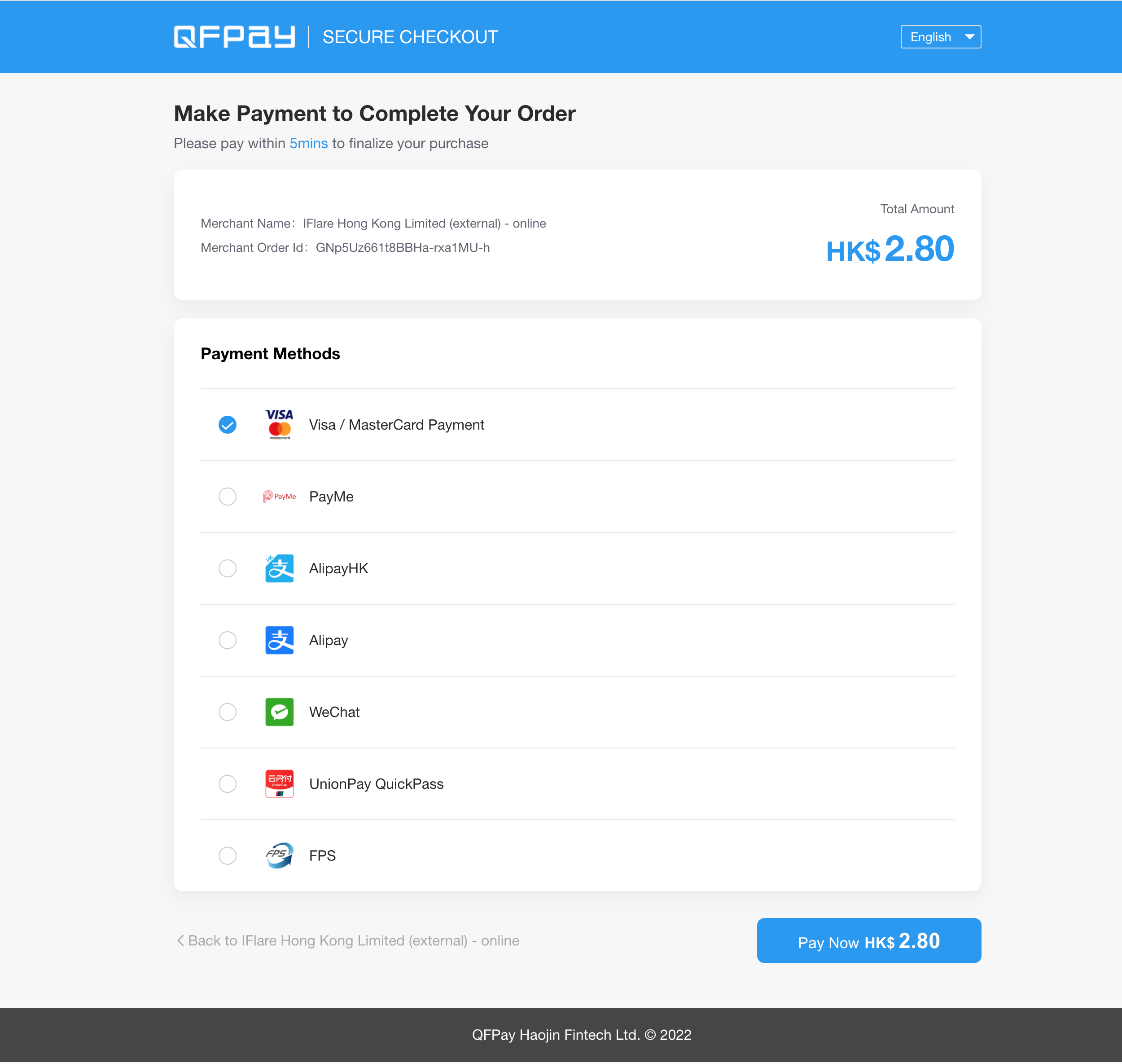 The checkout page is fully responsive and adapts automatically to different screen sizes.
***
# Customisation Options
If a merchant wishes to customise the checkout page, the following elements are currently supported.
Elements not listed below are **not supported for modification**.
***
## Supported Customisable Elements
### 1 Branding Elements
* Browser favicon (tab icon)
* Page logo
* Header horizontal stripe background colour
### 2 Payment Method Display
* Custom sorting order of payment methods
### 3 Payment Button
* Custom colour for the “Pay Now” button
Any UI components not explicitly listed above are currently not customisable.
***
## How to Request Customisation
To request checkout customisation, please provide the following information to technical support:
* `app_code`
* `client_key`
* Detailed customisation requirements
* Brand assets (logo files, colour codes, etc.)
Contact:
[technical.support@qfpay.com](mailto:technical.support@qfpay.com)
***
## Static Asset Requirements
Please ensure all submitted branding assets follow the specifications below:
### PC Logo
* Height: 40px
* No horizontal padding (no blank space on left or right)
### WAP Logo (Mobile)
* Height: 25px
* No horizontal padding
### Favicon
* Size: 15 × 15 px
PNG format with transparent background is recommended.
***
# Environment Notice
If test transactions are performed in the Live Testing environment, please refund them immediately to avoid reconciliation discrepancies.
For environment details, refer to:
[Environment Documentation](/integration/preparation/environments)
***
# Process Flow
The checkout page is fully responsive and adapts automatically to different screen sizes.
***
# Customisation Options
If a merchant wishes to customise the checkout page, the following elements are currently supported.
Elements not listed below are **not supported for modification**.
***
## Supported Customisable Elements
### 1 Branding Elements
* Browser favicon (tab icon)
* Page logo
* Header horizontal stripe background colour
### 2 Payment Method Display
* Custom sorting order of payment methods
### 3 Payment Button
* Custom colour for the “Pay Now” button
Any UI components not explicitly listed above are currently not customisable.
***
## How to Request Customisation
To request checkout customisation, please provide the following information to technical support:
* `app_code`
* `client_key`
* Detailed customisation requirements
* Brand assets (logo files, colour codes, etc.)
Contact:
[technical.support@qfpay.com](mailto:technical.support@qfpay.com)
***
## Static Asset Requirements
Please ensure all submitted branding assets follow the specifications below:
### PC Logo
* Height: 40px
* No horizontal padding (no blank space on left or right)
### WAP Logo (Mobile)
* Height: 25px
* No horizontal padding
### Favicon
* Size: 15 × 15 px
PNG format with transparent background is recommended.
***
# Environment Notice
If test transactions are performed in the Live Testing environment, please refund them immediately to avoid reconciliation discrepancies.
For environment details, refer to:
[Environment Documentation](/integration/preparation/environments)
***
# Process Flow
 1. Customer proceeds to checkout on the merchant website
2. Merchant redirects the customer to the QFPay hosted checkout page
3. Customer selects a payment method and completes payment
4. Customer is redirected back to the merchant website
***
# API Request
## Endpoint
```text TEXT theme={null}
https:///checkstand/#/?
```
## Method
```text TEXT theme={null}
GET
```
***
# Request Parameters
| Parameter | Type | Required | Description |
| ----------------------- | ----------- | -------- | --------------------------------------- |
| `appcode` | String(64) | Yes | Store identifier issued by QFPay |
| `sign_type` | String | Yes | `SHA256` (recommended) or `MD5` |
| `sign` | String | Yes | Generated signature |
| `paysource` | String | Yes | Must end with `_checkout` |
| `txamt` | Int | Yes | Amount in cents (e.g. 1099 = HKD 10.99) |
| `txcurrcd` | String(3) | Yes | Currency code (e.g. HKD) |
| `out_trade_no` | String(128) | Yes | Unique merchant transaction ID |
| `txdtm` | String | Yes | Timestamp (`YYYY-MM-DD HH:mm:ss`) |
| `return_url` | String | Yes | Redirect URL after successful payment |
| `failed_url` | String | Yes | Redirect URL after failed payment |
| `notify_url` | String | Yes | Asynchronous notification URL |
| `mchntid` | String(16) | No | Required in agent scenarios |
| `goods_name` | String(64) | No | Product name |
| `udid` | String(40) | No | Device identifier |
| `expired_time` | String | No | QR expiry time (5–120 minutes) |
| `checkout_expired_time` | String | No | Checkout session expiry |
| `limit_pay` | String | No | `no_credit` disables credit cards |
| `lang` | String | No | `zh-hk`, `zh-cn`, `en` |
| `cancel_url` | String | No | Redirect URL if user cancels |
***
# Creating a Checkout Order
Each `out_trade_no` must be unique to prevent duplicate transactions.
Generate the signature using your `client_key`, then redirect the customer to the constructed checkout URL.
***
# Example: Signature & Redirect
```javascript JavaScript theme={null}
const params = {
appcode: "YOUR_APPCODE",
goods_name: "checkout_product",
out_trade_no: "TXN1234567890",
paysource: "remotepay_checkout",
return_url: "https://merchant.com/success",
failed_url: "https://merchant.com/failed",
notify_url: "https://merchant.com/notify",
sign_type: "SHA256",
txamt: "1000",
txcurrcd: "HKD",
txdtm: "2025-01-01 12:00:00"
};
const apiKey = "YOUR_CLIENT_KEY";
const sorted = Object.keys(params)
.sort()
.map(k => `${k}=${params[k]}`)
.join("&");
const sign = sha256(sorted + apiKey);
const url = `https://test-openapi-hk.qfapi.com/checkstand/#/?${sorted}&sign=${sign}`;
window.location.href = url;
```
***
# Important Notes
* Always generate signatures on your server in production.
* Never expose your `client_key` in frontend code.
* Ensure your `notify_url` accepts POST callbacks.
* It is recommended to verify final transaction status using the Transaction Enquiry API.
1. Customer proceeds to checkout on the merchant website
2. Merchant redirects the customer to the QFPay hosted checkout page
3. Customer selects a payment method and completes payment
4. Customer is redirected back to the merchant website
***
# API Request
## Endpoint
```text TEXT theme={null}
https:///checkstand/#/?
```
## Method
```text TEXT theme={null}
GET
```
***
# Request Parameters
| Parameter | Type | Required | Description |
| ----------------------- | ----------- | -------- | --------------------------------------- |
| `appcode` | String(64) | Yes | Store identifier issued by QFPay |
| `sign_type` | String | Yes | `SHA256` (recommended) or `MD5` |
| `sign` | String | Yes | Generated signature |
| `paysource` | String | Yes | Must end with `_checkout` |
| `txamt` | Int | Yes | Amount in cents (e.g. 1099 = HKD 10.99) |
| `txcurrcd` | String(3) | Yes | Currency code (e.g. HKD) |
| `out_trade_no` | String(128) | Yes | Unique merchant transaction ID |
| `txdtm` | String | Yes | Timestamp (`YYYY-MM-DD HH:mm:ss`) |
| `return_url` | String | Yes | Redirect URL after successful payment |
| `failed_url` | String | Yes | Redirect URL after failed payment |
| `notify_url` | String | Yes | Asynchronous notification URL |
| `mchntid` | String(16) | No | Required in agent scenarios |
| `goods_name` | String(64) | No | Product name |
| `udid` | String(40) | No | Device identifier |
| `expired_time` | String | No | QR expiry time (5–120 minutes) |
| `checkout_expired_time` | String | No | Checkout session expiry |
| `limit_pay` | String | No | `no_credit` disables credit cards |
| `lang` | String | No | `zh-hk`, `zh-cn`, `en` |
| `cancel_url` | String | No | Redirect URL if user cancels |
***
# Creating a Checkout Order
Each `out_trade_no` must be unique to prevent duplicate transactions.
Generate the signature using your `client_key`, then redirect the customer to the constructed checkout URL.
***
# Example: Signature & Redirect
```javascript JavaScript theme={null}
const params = {
appcode: "YOUR_APPCODE",
goods_name: "checkout_product",
out_trade_no: "TXN1234567890",
paysource: "remotepay_checkout",
return_url: "https://merchant.com/success",
failed_url: "https://merchant.com/failed",
notify_url: "https://merchant.com/notify",
sign_type: "SHA256",
txamt: "1000",
txcurrcd: "HKD",
txdtm: "2025-01-01 12:00:00"
};
const apiKey = "YOUR_CLIENT_KEY";
const sorted = Object.keys(params)
.sort()
.map(k => `${k}=${params[k]}`)
.join("&");
const sign = sha256(sorted + apiKey);
const url = `https://test-openapi-hk.qfapi.com/checkstand/#/?${sorted}&sign=${sign}`;
window.location.href = url;
```
***
# Important Notes
* Always generate signatures on your server in production.
* Never expose your `client_key` in frontend code.
* Ensure your `notify_url` accepts POST callbacks.
* It is recommended to verify final transaction status using the Transaction Enquiry API.