> ## Documentation Index
> Fetch the complete documentation index at: https://sdk.qfapi.com/llms.txt
> Use this file to discover all available pages before exploring further.
# App Call App Android SDK
> Integrates the QFPay HaoJin Android SDK to enable App-to-App payments, refunds, queries, pre-authorisation, and card settlement.
## Latest Version
**version 2.3.4.jar**
The SDK supports configurable scan modes:
* `CollectionReq.SCAN_TYPE_SCAN` — Scan customer QR code
* `CollectionReq.SCAN_TYPE_QRCODE` — Display QR code for customer to scan
### Example
```java theme={null}
CollectionReq req = new CollectionReq(Long.parseLong(money));
req.setScan_type(scan_type);
```
To force QR code display mode (e.g. static QR for customer scanning), use `SCAN_TYPE_QRCODE`.
The default camera used is the rear camera.
***
## Introduction
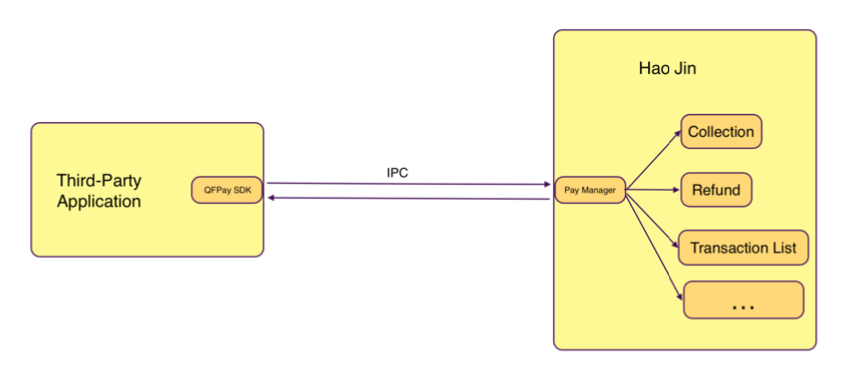
HaoJin is a mobile application that provides integrated payment collection for merchants.
This SDK enables third-party apps to invoke HaoJin for payment operations.
Supported capabilities:
1. Payment, refund, transaction query, and transaction details
2. Transaction summary and channel configuration retrieval
3. Card transaction query, cancellation, and adjustment
 ***
## Installation & Setup
### Required Permission
Add to **AndroidManifest.xml**:
```xml theme={null}
```
HaoJin App must be installed on the device.
***
### Integrate JAR
Download and place the SDK in `/libs`, then import in `build.gradle`.
[Download Latest SDK](https://github.com/QFPay/docs/raw/refs/heads/docusaurus-developer-center/static/files/qfpay_haojin_api_2.3.6.zip)
***
### Set Target App ID
```java theme={null}
Config.setTargetAppId("in.haojin.nearbymerchant.oversea");
```
***
### Proguard Rules
Add to `proguard-rules.pro`:
```proguard theme={null}
-dontnote com.qfpay.haojin.model.**
-keep class com.qfpay.haojin.model.** {*;}
```
***
## API Usage
### Create Trade API Instance
```java theme={null}
ITradeAPI mTradeApi = TradeApiFactory.createTradeApi(XXXActivity, this);
```
***
## Collection (Payment)
```java theme={null}
CollectionReq collectionReq = new CollectionReq(100);
collectionReq.setScan_type(CollectionReq.SCAN_TYPE_SCAN);
collectionReq.setOut_trade_no("EXT202312345");
collectionReq.setWait_card_timeout(120);
collectionReq.setPay_method("card_payment");
collectionReq.setCamera_id(0);
int ret = mTradeApi.doTrade(collectionReq);
```
### Parse Result
```java theme={null}
CollectionResp collectionResp =
(CollectionResp) mTradeApi.parseResponse(requestCode, resultCode, data);
if (collectionResp == null) return;
if (collectionResp.isSuccess()) {
Transaction transaction = collectionResp.getPayResult();
} else {
Log.e(TAG, collectionResp.getErrorMsg());
}
```
The returned response may be `null`. Always perform a null check.
***
## Refund
```java theme={null}
RefundReq refundReq = new RefundReq(qfOrderId);
int ret = mTradeApi.doTrade(refundReq);
```
### Parse
```java theme={null}
RefundResp refundResp =
(RefundResp) mTradeApi.parseResponse(requestCode, resultCode, data);
if (refundResp != null && refundResp.isSuccess()) {
Transaction transaction = refundResp.getRefundResult();
}
```
***
## Query Transactions
### Multiple Transactions
```java theme={null}
GetTransListReq req = new GetTransListReq();
req.setChannels(selectedChannel);
req.setTypes(selectedType);
req.setMonth(month);
req.setStartTime(startTime);
req.setEndTime(endTime);
req.setPageSize(pageSize);
req.setPageNum(pageNum);
int ret = mTradeApi.doTrade(req);
```
• Supported types: payment, refund\
• Time format: yyyy-MM-dd HH:mm:ss\
• Month format: yyyyMM\
• Page index starts from 1\
• Time range overrides monthly query
***
### Transaction Detail
```java theme={null}
GetTransReq req = new GetTransReq(qfOrderId);
req.setOut_trade_no("EXT20230123");
int ret = mTradeApi.doTrade(req);
```
***
## Transaction Summary
```java theme={null}
CheckTradeSumReq req = new CheckTradeSumReq();
int ret = mTradeApi.doTrade(req);
```
***
## User Configuration
```java theme={null}
GetUserConfigReq req = new GetUserConfigReq();
int ret = getTradeApi().doTrade(req);
```
If user configuration cannot be retrieved, it may indicate an authorisation issue. Contact technical support.
***
## Pre-authorisation
Suitable for scenarios such as hotel check-ins or equipment rental where funds are reserved and later captured or cancelled.
### Deduct
```java theme={null}
PreAuthTransDeductReq req = new PreAuthTransDeductReq(transId);
int ret = mTradeApi.doTrade(req);
```
### Cancel
```java theme={null}
PreAuthTransCancelReq req = new PreAuthTransCancelReq(transId);
int ret = mTradeApi.doTrade(req);
```
### List
```java theme={null}
PreAuthTransListReq req = new PreAuthTransListReq(10, 1);
int ret = mTradeApi.doTrade(req);
```
### Detail
```java theme={null}
PreAuthTransDetailReq req = new PreAuthTransDetailReq(transId);
int ret = mTradeApi.doTrade(req);
```
***
## Card Operations
### Card Refund
```java theme={null}
CardRefundReq req = new CardRefundReq(qfOrderId);
int ret = mTradeApi.doTrade(req);
```
### Card Settlement
```java theme={null}
CardSettleReq req = new CardSettleReq();
int ret = mTradeApi.doTrade(req);
```
***
## Version History
### v2.3.4
* Added scan type configuration
### v2.3.3
* Added `getOut_trade_no` and `getCardscheme` methods
### v2.3.2
* External order number support
* Configurable card swipe timeout
### v2.3.1
* Payment method selection support
* Camera selection support
***
## Installation & Setup
### Required Permission
Add to **AndroidManifest.xml**:
```xml theme={null}
```
HaoJin App must be installed on the device.
***
### Integrate JAR
Download and place the SDK in `/libs`, then import in `build.gradle`.
[Download Latest SDK](https://github.com/QFPay/docs/raw/refs/heads/docusaurus-developer-center/static/files/qfpay_haojin_api_2.3.6.zip)
***
### Set Target App ID
```java theme={null}
Config.setTargetAppId("in.haojin.nearbymerchant.oversea");
```
***
### Proguard Rules
Add to `proguard-rules.pro`:
```proguard theme={null}
-dontnote com.qfpay.haojin.model.**
-keep class com.qfpay.haojin.model.** {*;}
```
***
## API Usage
### Create Trade API Instance
```java theme={null}
ITradeAPI mTradeApi = TradeApiFactory.createTradeApi(XXXActivity, this);
```
***
## Collection (Payment)
```java theme={null}
CollectionReq collectionReq = new CollectionReq(100);
collectionReq.setScan_type(CollectionReq.SCAN_TYPE_SCAN);
collectionReq.setOut_trade_no("EXT202312345");
collectionReq.setWait_card_timeout(120);
collectionReq.setPay_method("card_payment");
collectionReq.setCamera_id(0);
int ret = mTradeApi.doTrade(collectionReq);
```
### Parse Result
```java theme={null}
CollectionResp collectionResp =
(CollectionResp) mTradeApi.parseResponse(requestCode, resultCode, data);
if (collectionResp == null) return;
if (collectionResp.isSuccess()) {
Transaction transaction = collectionResp.getPayResult();
} else {
Log.e(TAG, collectionResp.getErrorMsg());
}
```
The returned response may be `null`. Always perform a null check.
***
## Refund
```java theme={null}
RefundReq refundReq = new RefundReq(qfOrderId);
int ret = mTradeApi.doTrade(refundReq);
```
### Parse
```java theme={null}
RefundResp refundResp =
(RefundResp) mTradeApi.parseResponse(requestCode, resultCode, data);
if (refundResp != null && refundResp.isSuccess()) {
Transaction transaction = refundResp.getRefundResult();
}
```
***
## Query Transactions
### Multiple Transactions
```java theme={null}
GetTransListReq req = new GetTransListReq();
req.setChannels(selectedChannel);
req.setTypes(selectedType);
req.setMonth(month);
req.setStartTime(startTime);
req.setEndTime(endTime);
req.setPageSize(pageSize);
req.setPageNum(pageNum);
int ret = mTradeApi.doTrade(req);
```
• Supported types: payment, refund\
• Time format: yyyy-MM-dd HH:mm:ss\
• Month format: yyyyMM\
• Page index starts from 1\
• Time range overrides monthly query
***
### Transaction Detail
```java theme={null}
GetTransReq req = new GetTransReq(qfOrderId);
req.setOut_trade_no("EXT20230123");
int ret = mTradeApi.doTrade(req);
```
***
## Transaction Summary
```java theme={null}
CheckTradeSumReq req = new CheckTradeSumReq();
int ret = mTradeApi.doTrade(req);
```
***
## User Configuration
```java theme={null}
GetUserConfigReq req = new GetUserConfigReq();
int ret = getTradeApi().doTrade(req);
```
If user configuration cannot be retrieved, it may indicate an authorisation issue. Contact technical support.
***
## Pre-authorisation
Suitable for scenarios such as hotel check-ins or equipment rental where funds are reserved and later captured or cancelled.
### Deduct
```java theme={null}
PreAuthTransDeductReq req = new PreAuthTransDeductReq(transId);
int ret = mTradeApi.doTrade(req);
```
### Cancel
```java theme={null}
PreAuthTransCancelReq req = new PreAuthTransCancelReq(transId);
int ret = mTradeApi.doTrade(req);
```
### List
```java theme={null}
PreAuthTransListReq req = new PreAuthTransListReq(10, 1);
int ret = mTradeApi.doTrade(req);
```
### Detail
```java theme={null}
PreAuthTransDetailReq req = new PreAuthTransDetailReq(transId);
int ret = mTradeApi.doTrade(req);
```
***
## Card Operations
### Card Refund
```java theme={null}
CardRefundReq req = new CardRefundReq(qfOrderId);
int ret = mTradeApi.doTrade(req);
```
### Card Settlement
```java theme={null}
CardSettleReq req = new CardSettleReq();
int ret = mTradeApi.doTrade(req);
```
***
## Version History
### v2.3.4
* Added scan type configuration
### v2.3.3
* Added `getOut_trade_no` and `getCardscheme` methods
### v2.3.2
* External order number support
* Configurable card swipe timeout
### v2.3.1
* Payment method selection support
* Camera selection support